Independent ComforTrade platform guide · Demo, OTC and account access
ComforTrade Trading Platform: From Sign-Up to OTC Trades
Need the ComforTrade login, a way to open the free demo, or a clearer look at the trading terminal before registering? This guide follows the same path a visitor takes inside ComforTrade: account access, virtual trades, the BUY/SELL ticket, chart tools, mobile access and the cashier. It includes original terminal screenshots and our recorded walkthrough—not a rating or a copied list of broker slogans.
DigitalOptions.co is independent and is not the ComforTrade operator. The platform button above is an affiliate link.
- Browser terminalDesktop and mobile
- Free demoNo initial deposit
- BTC/USD OTCCaptured in our recording
- Up to 90%Observed on a sample ticket
By Alex Vega · Interface recording: 9 November 2026 · How we verify trading platforms
Platform overview
ComforTrade offers fixed-time trading contracts on currency and crypto-linked instruments, including OTC-labelled markets. Its web terminal provides demo and real account modes; you can explore the demo without making a first deposit. If you already have an account, the same platform entrance leads to the sign-in screen.
ComforTrade Login & Registration: Account Access
ComforTrade combines registration, login and the trading workspace in the same browser platform. You do not need to hunt for a separate “official login” page on a third-party website. Use the platform access button here and choose the action that matches your account status.


Register and unlock the demo
In our recording the registration panel offered Google sign-up or email and password, password confirmation, an optional promo-code field and acceptance of the terms. Returning users can choose the visible Sign In tab. The matching Sign In screenshot shows the email/password fields and account-recovery link.
- Open the platform and select Create Account or Sign Up.
- Enter an email address you control, choose a password and review the account terms.
- Complete any confirmation step currently shown by the registration interface.
- Once your account opens, locate the Demo Account option rather than depositing real funds.
The broker’s published onboarding instructions describe email-and-password registration and a demo that opens immediately after account creation. If the platform asks for extra verification, follow the current instructions shown in your own account; do not attempt to bypass regional or identity checks.
Sign in to an existing account
Already registered? Choose Sign In and use the credentials for your existing profile. If you cannot access your account, use password recovery instead of opening a second account. The broker’s agreement restricts duplicate profiles. A login problem is different from a trading-terminal problem: first recover the account, then confirm which balance mode is selected.
Useful distinction: logging in gives access to the account; selecting Demo determines whether the next trade uses virtual funds. Check the account label before placing a contract.
ComforTrade Demo Account: Our First BUY/SELL Trades
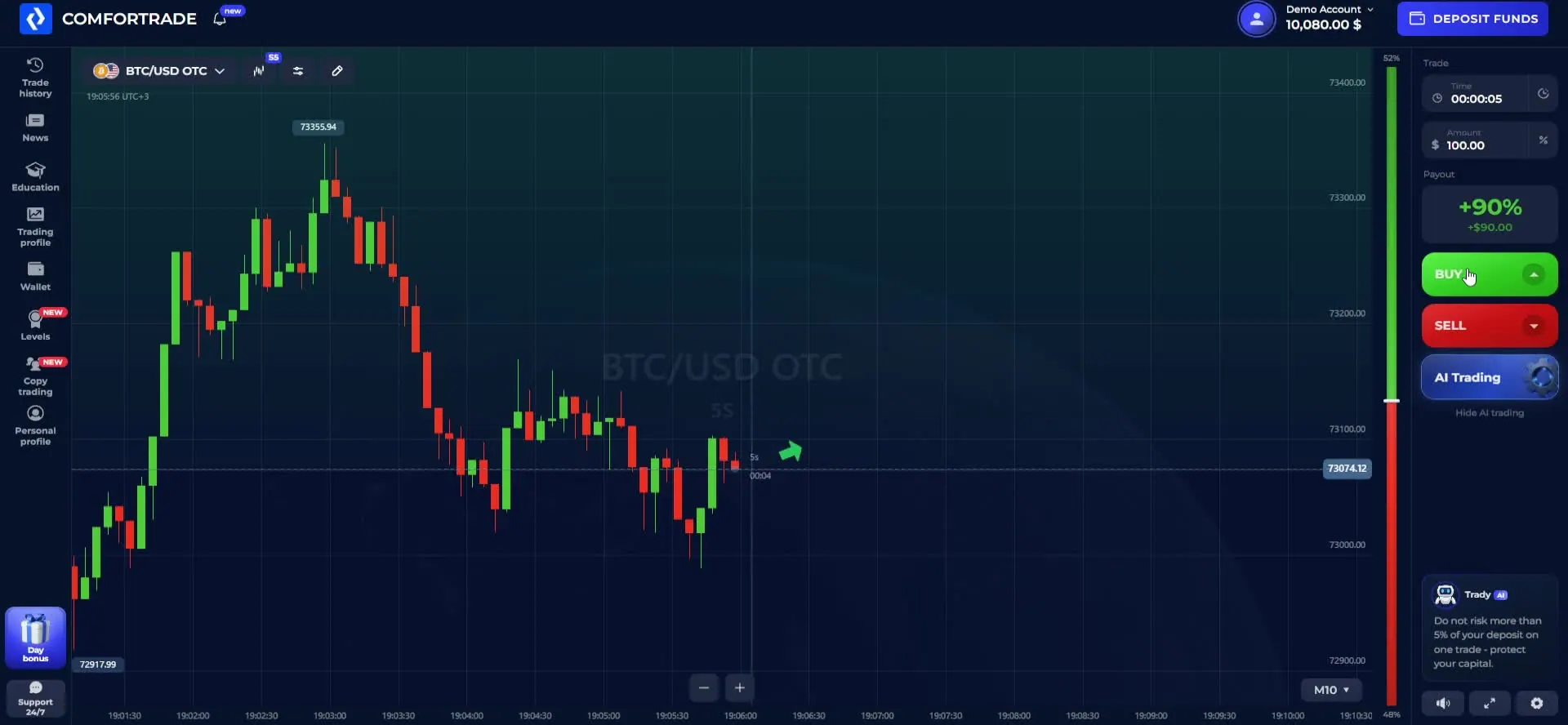
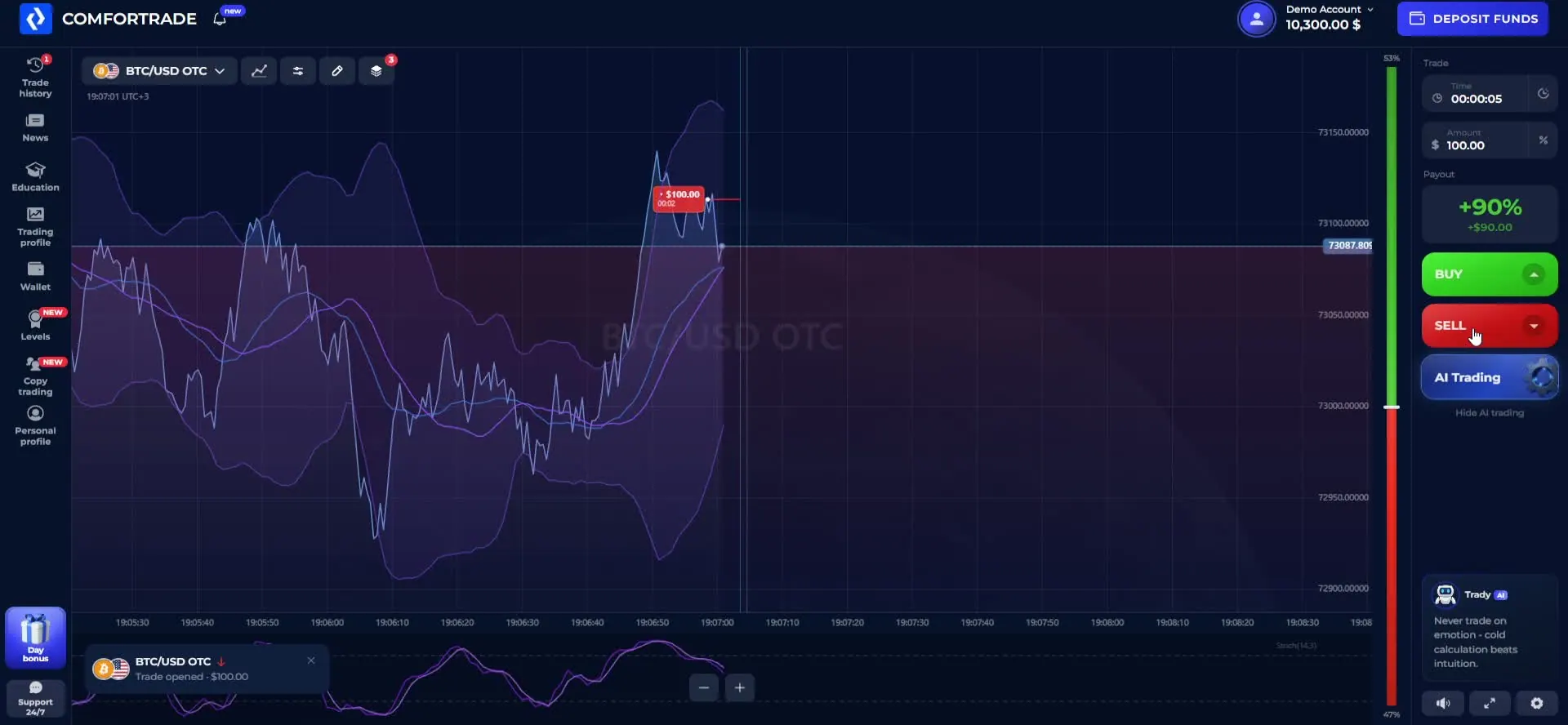
The ComforTrade demo account is the fastest way to learn the controls without transferring money. In our recording, the demo label and virtual balance appear above the terminal; the contract ticket remains on the right while the chart occupies the middle of the screen. The demo shows the normal sequence—asset, amount, expiry and direction—without involving a live deposit.
Inside Our Recorded ComforTrade Demo Trade
These are settings visible in the recorded virtual-money session, not an estimate of typical returns or a completed real-money trade.
| Recorded parameter | What the session showed |
|---|---|
| Instrument | BTC/USD OTC |
| Contract duration | 5 seconds in the sample ticket |
| Demo stake | $100 virtual money |
| Quoted payout | 90% on the captured ticket, not a fixed platform-wide rate |
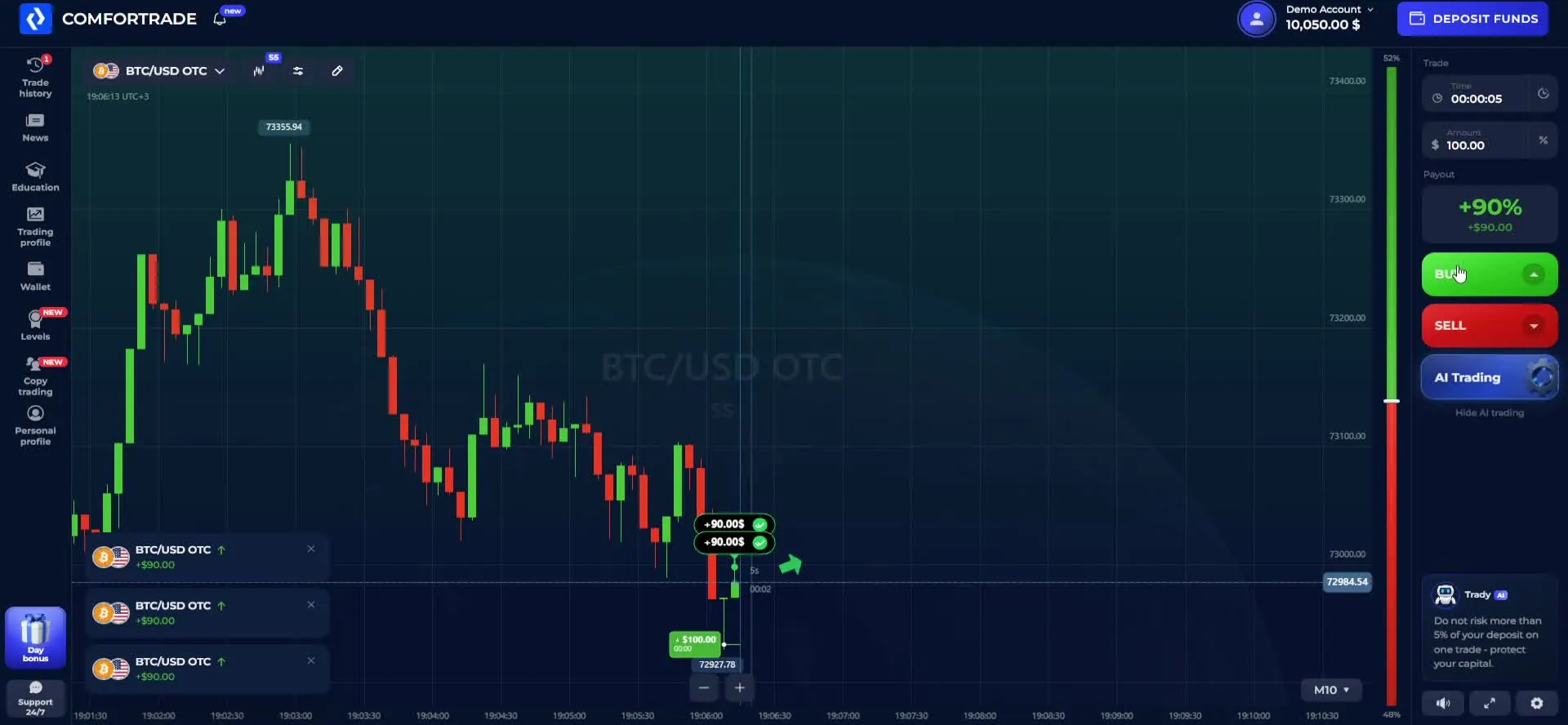
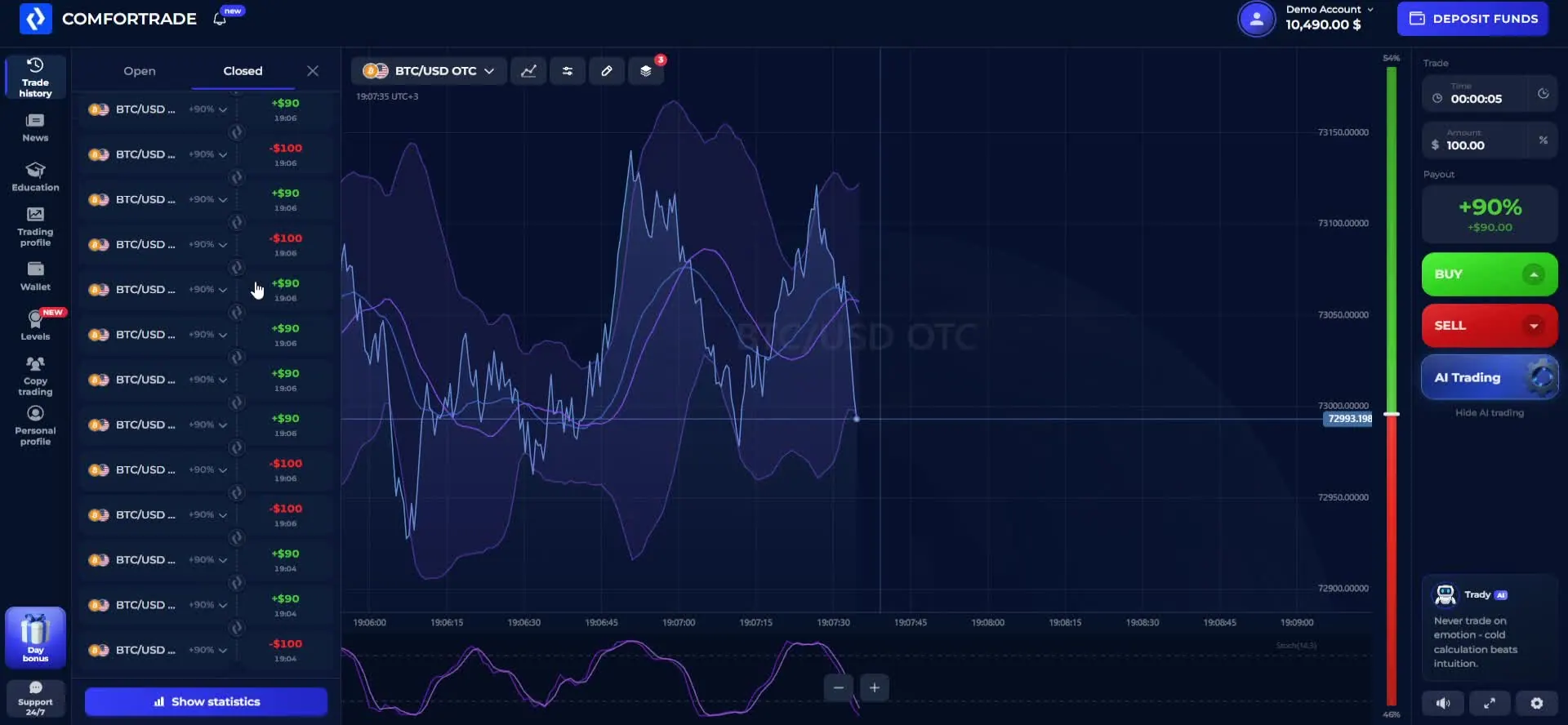
The recording also shows completed practice positions, including positive and negative outcomes. The chart and trade-history screenshots below document the sequence; they do not verify live execution or withdrawals.
Open a practice position
- Confirm the account switcher says Demo Account.
- Open the instrument selector and choose a market. The recording includes BTC/USD OTC as one example.
- Review the chart, the expiration time and the amount entered in the ticket.
- Choose BUY for a higher closing price or SELL for a lower one.
- Wait for expiry, then inspect the result in trade history instead of relying on the animation alone.
During the captured session, multiple demo positions completed and the history displayed both positive and negative results. A profitable virtual trade is not a guarantee of what will happen in a real account. You can use practice mode to become familiar with the controls, compare expiry settings and understand how finished trades are recorded.
Watch the ComforTrade Terminal Walkthrough
Our original video follows the trading screen rather than using promotional animations. It moves from the browser platform and demo chart to market selection, chart tools, completed practice trades, then the wallet and verification screens. This is the same recorded interface used for the screenshots in this guide.
Original ComforTrade walkthrough: browser terminal, OTC assets, demo trades, indicators, trade history, payment methods, USDT deposit form and the withdrawal-verification interface. Personal account and payment details have been concealed in the edited video.
If you prefer a written walkthrough, continue with the contract controls below. The video and screenshots explain how the recorded interface looked; they do not represent live quotes or promise the same payout on every instrument.
How OTC Contracts, Expiry and Payouts Work
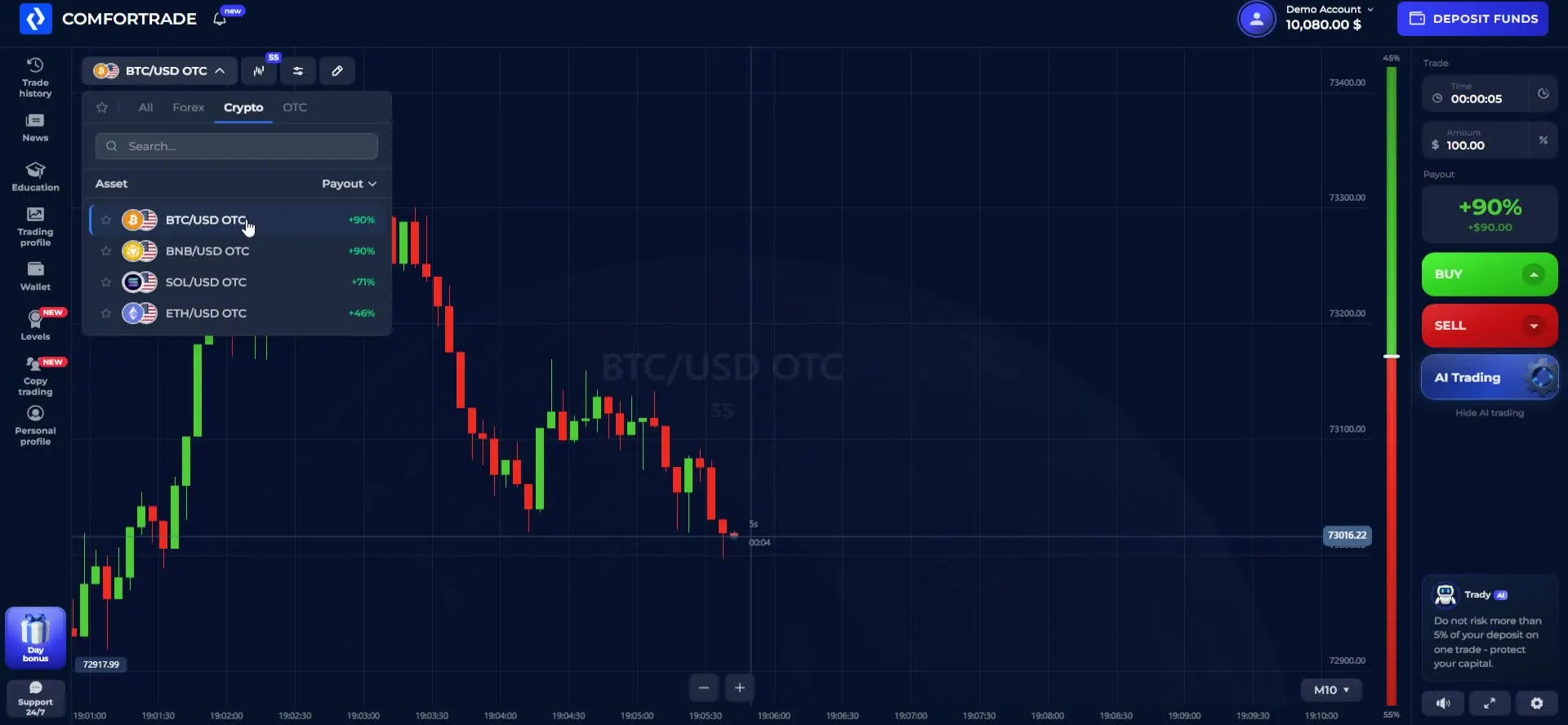
ComforTrade uses short-duration contracts with a simple price-direction choice. The recorded terminal labels one example BTC/USD OTC. OTC here is a market label inside the platform; it should not be confused with a conventional spot purchase of Bitcoin. You choose a direction and an expiry, and the contract is settled by comparing the price at entry with the price at the selected end time.
| Contract control | What to check before placing a contract |
|---|---|
| Asset | Choose the price series and confirm the market label in the instrument selector; available markets and quotes can vary. |
| Expiry | Check when the position settles and whether the selected duration leaves enough time to review the entry price. |
| Amount | Verify the stake shown on the ticket and which balance mode will fund it before confirming a direction. |
| Payout | Read the current quoted profit for a successful prediction; it is not the probability of winning and can change by instrument. |
| BUY / SELL | BUY predicts a higher closing price; SELL predicts a lower one relative to the entry price at expiry. |
A 90% quoted profit means a winning $100 contract would show a $90 net gain, whereas a losing one could lose the $100 stake; it does not mean a 90% probability of success. Payout quotes, available instruments and allowable expiries may differ in your session. The broker’s agreement describes these as fixed-term CFD contracts, while the interface uses the familiar BUY/SELL trading workflow.
Before opening even a demo contract, review the amount and time shown beside the buttons. A five-second ticket is useful to understand the interface quickly, but its very short timeframe makes price movement and timing particularly sensitive. Anyone exploring more than one market should re-check the displayed payout each time the asset changes.
Indicators, Chart Settings and Finished Trades
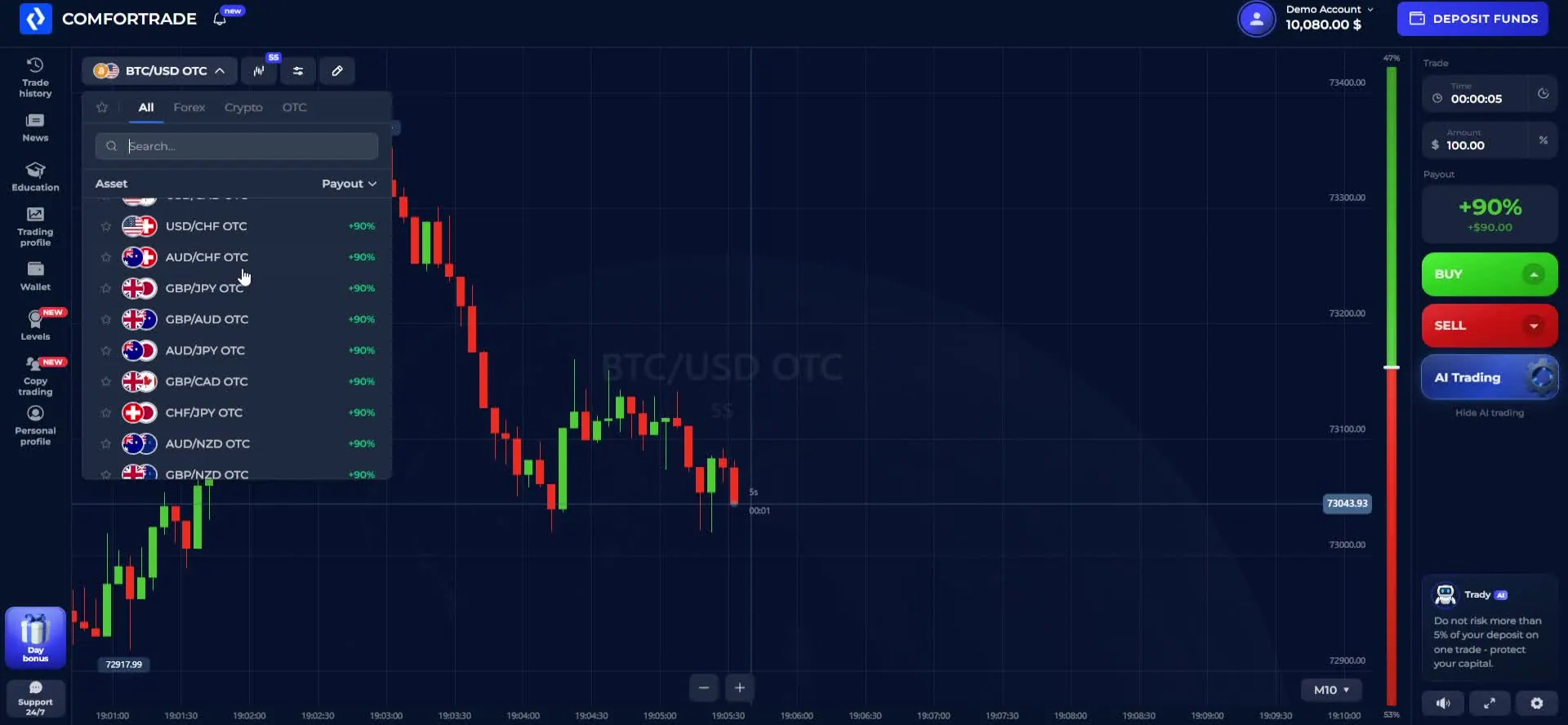
The ComforTrade workspace is more than the two coloured trade buttons. Our recorded session moves between the price chart, asset picker and chart overlays. This is useful for anyone comparing how the terminal works on a laptop or desktop: the chart stays visible while the contract settings are arranged separately.
Charts and technical indicators
The recording includes candlestick and line-style chart views, chart-time controls and indicator overlays. Select a tool from the chart menu, look for its settings, and check whether it appears over the price or in a separate panel. More indicators do not automatically improve a contract outcome; use them to understand the platform layout and display options before changing trade parameters.
Finding your closed trades
Open Trade History and switch between open and closed contracts. The captured results show both green positive amounts and red losses on demo trades. This section answers a practical question that a promotional feature list rarely does: where to inspect a settled contract and compare its result with the selected instrument and expiry.
For a quick self-check, look at the instrument, expiry, stake and resulting amount together. The demo trade history can help you learn the accounting of fixed-time contracts without relying on a single winning screenshot. The OTC weekend trading guide explains why session labels and trading hours matter when comparing markets.
Trading from a Phone or Desktop Browser
ComforTrade mobile access does not require a desktop installation. The broker describes a web trading terminal that opens in compatible browsers on computers and phones. Start from the same account-access link, sign in and check whether the Demo / Real selector appears in the mobile layout before starting a trade.
On a wide desktop screen, the asset picker, chart and BUY/SELL panel can appear beside one another. A phone has much less width, so the interface may collapse menus or stack the chart and controls. Before placing a mobile contract, confirm the instrument, expiry, amount and selected account mode in the current layout instead of assuming they match the last desktop session.
If you are searching for a ComforTrade app, Android download or iPhone access, the browser version is the verified starting point. We do not claim that a particular APK or App Store listing is available unless the operator has published and confirmed it. A shortcut added to a phone’s home screen is not the same thing as a separately distributed native app.
For traders who want to explore the interface before registering on a second device, watch the video above on the phone and open the demo workspace separately. Your account balance and contract settings should always be checked in the live session.
Inside the Cashier: Cards, USDT and Deposit Minimums
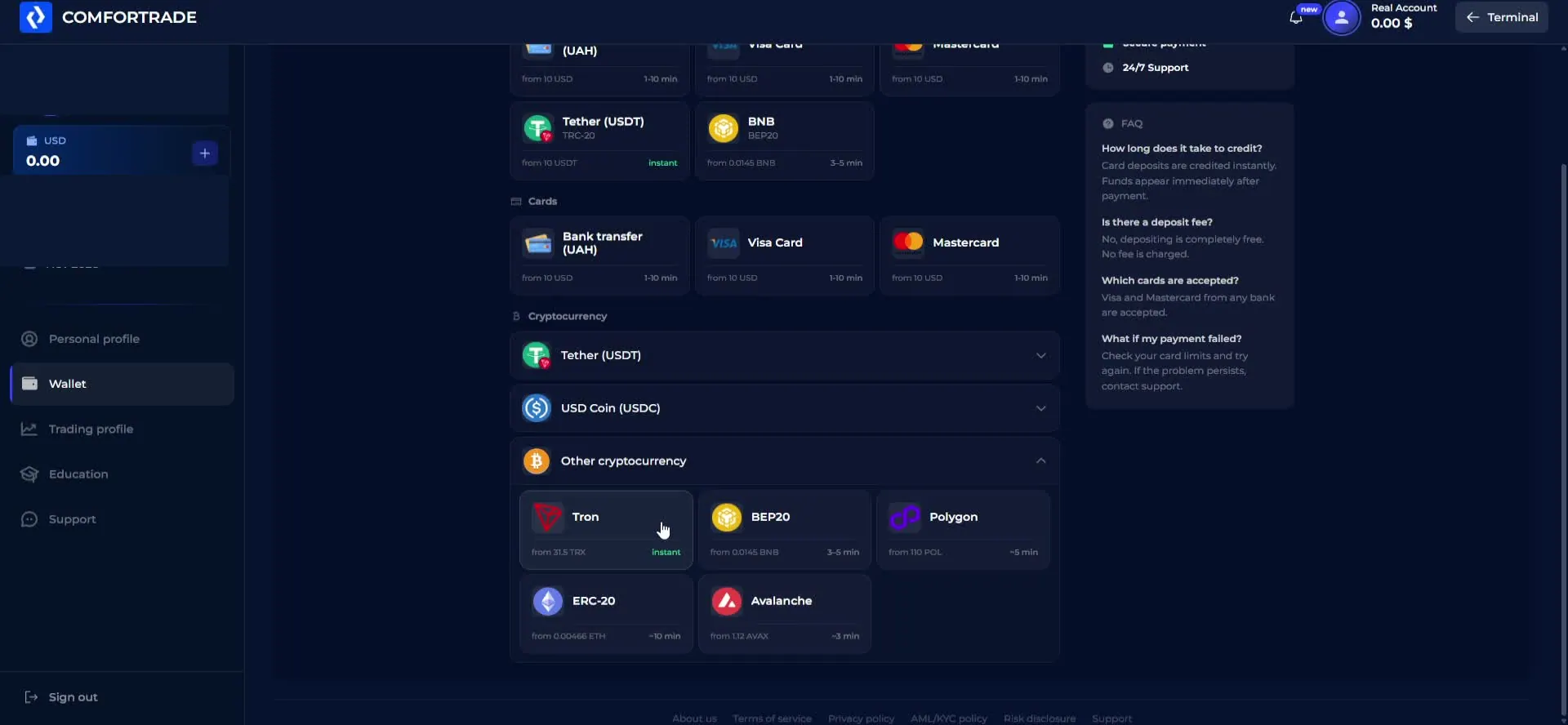
From the account menu, the ComforTrade deposit section opens a cashier with card and cryptocurrency choices. The recorded screen shows bank-card routes and Tether (USDT), including TRC-20 and other displayed network options. Selecting a method brings up a more specific form with its own amount fields and minimum.
Why the published minimum and the USDT form differ
The broker’s published Client Agreement lists a general minimum deposit of $7, while allowing different limits for specific payment routes. In our captured USDT TRC-20 screen, the form indicated a minimum deposit of 10 USDT. These are not interchangeable figures: the first describes a general contractual baseline; the second is what one payment interface actually displayed at the time of recording.
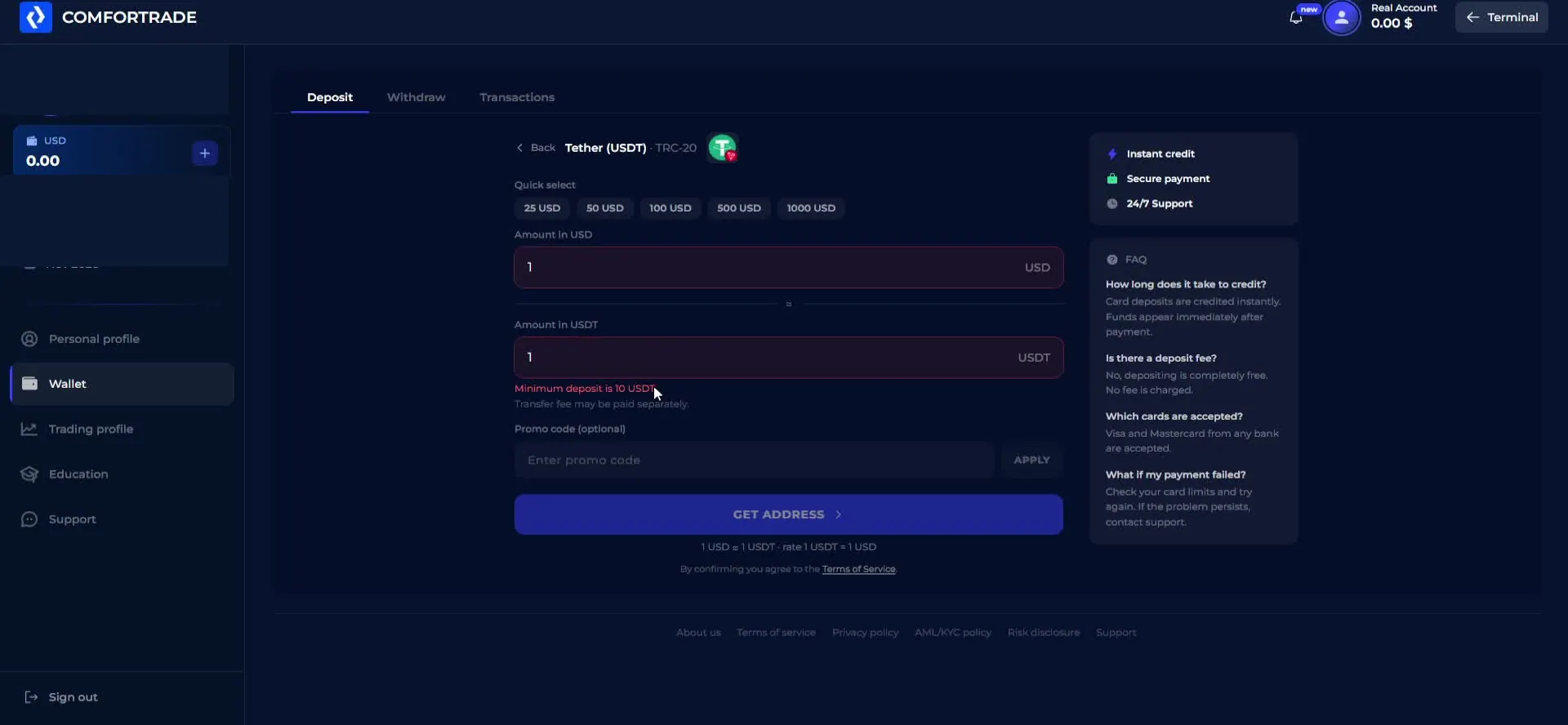
To inspect a payment route, open the wallet, choose a method and review its currency, blockchain network where relevant, minimum amount and any displayed fee or confirmation instruction. Check the current values again before initiating a transaction, because payment providers and limits can change. A TRC-20 wallet address is not interchangeable with a BEP-20 or ERC-20 address.
If you are comparing methods before funding any account, the trading-platform deposit checklist explains what to check about payment routes, account rules and verification.
Our recording goes through the available screens only. It does not show a successful transfer, credited deposit or any real money sent. Private account data, payment addresses and QR codes should remain hidden in published captures; their absence does not remove the useful method and limit information.
ComforTrade Withdrawals: $12 Minimum & KYC
The ComforTrade withdrawal workflow starts from the same account wallet. The broker’s published agreement lists a general minimum withdrawal of $12 and permits method-specific conditions. Its payment policy describes normal processing windows, subject to checks and payment-provider delays. This is information about published terms, not a result of our own withdrawal test.
In the recorded account, selecting Withdraw displayed a Verification required message. The route directed the account holder to complete profile and identity checks before requesting a payout. That is a clear screen-level observation and a useful distinction from simply saying the platform has a withdrawal button.
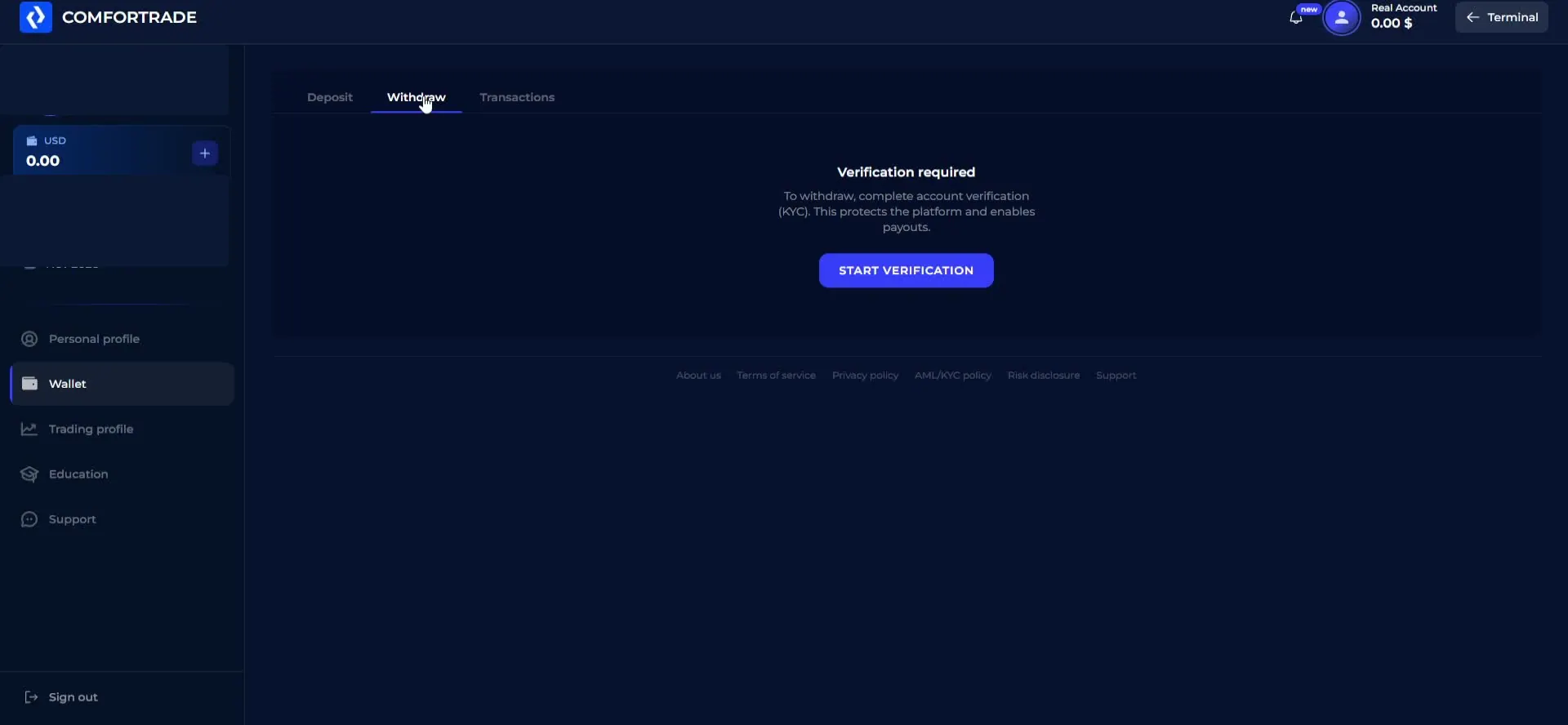
For an existing account holder, the practical sequence is to open Wallet, select Withdraw, review the current minimum and available payment route, then follow any verification prompt inside the account. If the chosen option is not available, use the operator’s account support rather than entering payment details on an unrelated page.
If you already have a delayed or rejected request, our withdrawal troubleshooting guide explains how to document its status and payment references.
What this guide does not claim: we did not submit a withdrawal, complete KYC or receive a payout. The account screen and current documents are sufficient to explain the available interface without describing a transaction that did not happen.
ComforTrade Questions Answered
What is ComforTrade and how do I access its trading platform?
ComforTrade is a browser-based trading platform with demo and real account modes, BUY/SELL fixed-time contracts and OTC-labelled instruments. Use the access link on this page, then register or sign in. DigitalOptions.co is an independent guide, not the platform operator.
How can I log in to my ComforTrade account?
Open the platform using the link on this page, select Sign In, and enter the email address and password associated with your account. If you have lost your password, use the recovery option on the sign-in screen.
Can I create a ComforTrade demo account without depositing money?
Yes. The platform describes a free demo mode available after account creation, without an initial deposit. The balance is virtual and cannot be withdrawn.
How do BUY and SELL contracts work on ComforTrade?
Choose an asset, contract amount and expiration time. BUY is a prediction that the closing price will be higher than the entry price, while SELL is a prediction that it will be lower. The platform settles the contract when the selected time expires.
What is the ComforTrade minimum deposit?
The published Client Agreement lists a general minimum deposit of $7, but individual methods can have different limits. In our recorded USDT TRC-20 form, the displayed minimum was 10 USDT. Check the amount shown in your own cashier before proceeding.
What is the minimum withdrawal on ComforTrade?
The published Client Agreement lists a general withdrawal minimum of $12 and allows method-specific conditions. The recorded account required verification before a withdrawal request could proceed. We did not perform a real-money withdrawal.
Is there a ComforTrade app for Android or iPhone?
The ComforTrade terminal works in a mobile browser, as well as in a desktop browser. Do not assume that an official native app or APK is available unless you can verify it directly in the current platform interface.
Can I trade OTC instruments using the demo balance?
The recorded demo session displayed BTC/USD OTC and other OTC-labelled instruments with selectable expiry times. The session also displayed a 90% payout quote for one example ticket; payouts and instrument availability may change.
Is DigitalOptions.co the official ComforTrade website?
No. DigitalOptions.co independently explains ComforTrade registration, account access, demo trading, payment screens and terminal functions. The platform buttons on this page are affiliate links to the broker.
Ready to Open ComforTrade?
Start with the browser terminal, choose the demo if you want to explore the controls, and use the real trading ticket only when you understand its amount, expiry and payout. The walkthrough above shows how to locate the instruments, chart tools, trade history and wallet without treating a sample payout as a promise.
The same platform entrance works for a new registration or a returning account holder. If you’re looking for ComforTrade login, a free demo account or the OTC trading terminal, use the button below to access the platform directly.
Affiliate disclosure: DigitalOptions.co may earn a commission if you register through a sponsored link. Trading fixed-term contracts can result in losing the amount staked. Demo results are virtual and do not guarantee future performance.