BinoDex · Original platform walkthrough
Inside BinoDex: From Account Access to Demo Trading
Looking for BinoDex official site access before signing up? This independent guide shows the real account-access screen, our recorded demo trade, and how AI Trading, Copy Trading, Futures and crypto payments appear inside the platform.
Independent platform guide · The platform button uses our affiliate link.
BinoDex Access & Sign Up: Email, Google or Wallet
For BinoDex official site access, use the platform’s account window rather than a separate sign-up form. BinoDex combines sign-in and sign-up in one access window. Our original 26 October 2026 screen shows email, an optional referral-code field, Google sign-in and a wallet connection option. DigitalOptions.co independently documents the steps; the Open BinoDex button uses an affiliate redirect, not a direct link to a named official domain.
FIRST ACCESS · WHAT TO EXPECT
- Open BinoDex using the access button above; this button uses our affiliate route.
- Choose email, Sign in with Google or Connect wallet in the combined access window.
- For email access, the visible form says that it sends a login code. Follow the on-screen instructions; the referral-code field is optional.
- After access is completed, move into the trading interface and select the demo account to inspect the terminal without risking real funds.
Our recording confirms the access window and subsequent demo terminal, not an independent proof of email-code delivery or referral attribution. Do not enter a code or credentials into a third-party copy of the form.
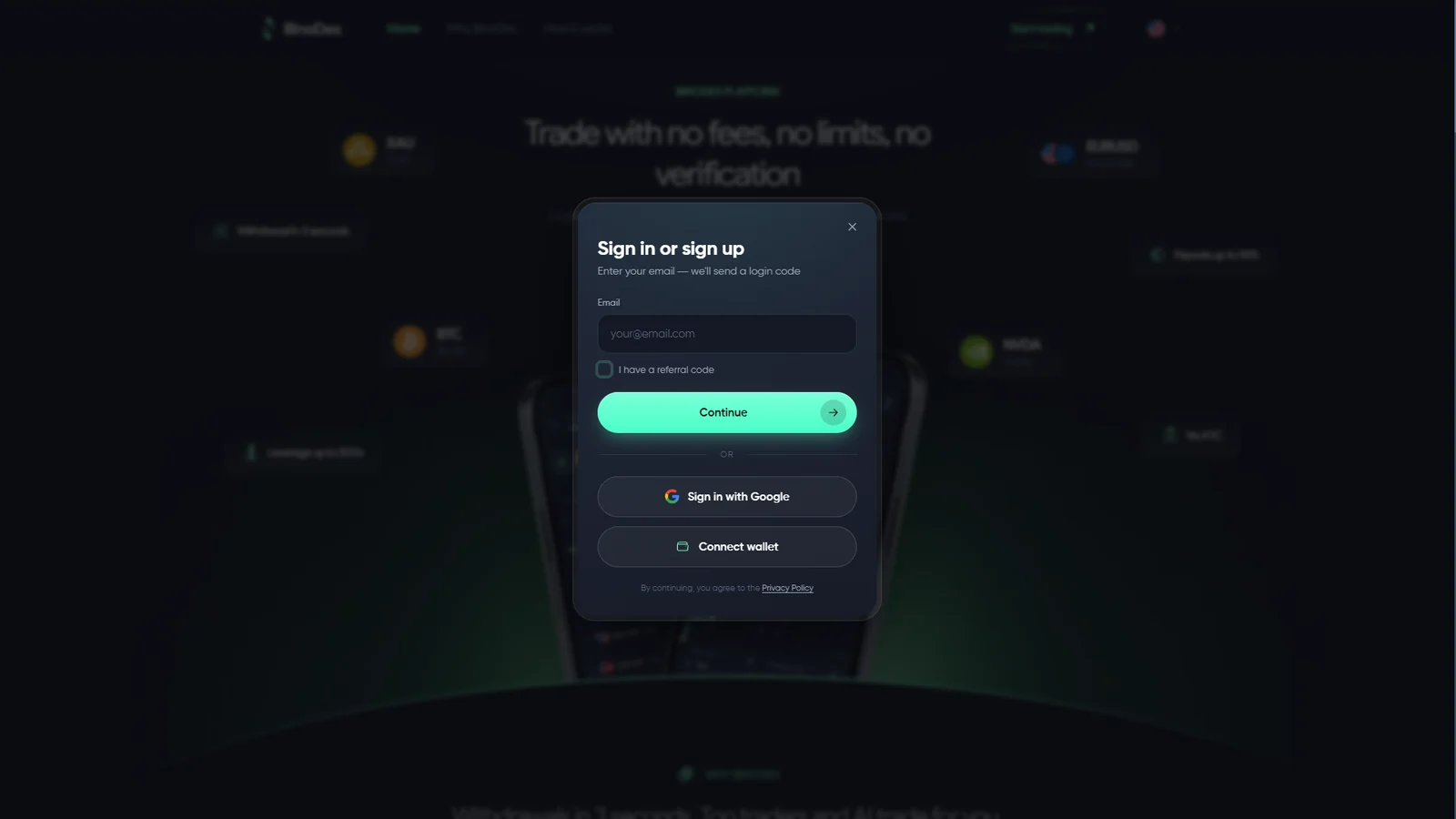
Two different tasks: the access screen is for entering or creating an account; demo trading happens inside the platform afterward. Our page is an independent guide, not the platform’s official website.
BinoDex Demo Account and $10,000 Virtual Balance
The BinoDex demo session we checked displayed a $10,000 virtual balance. We used it to inspect the actual Digital Options workflow rather than relying only on public marketing screens.
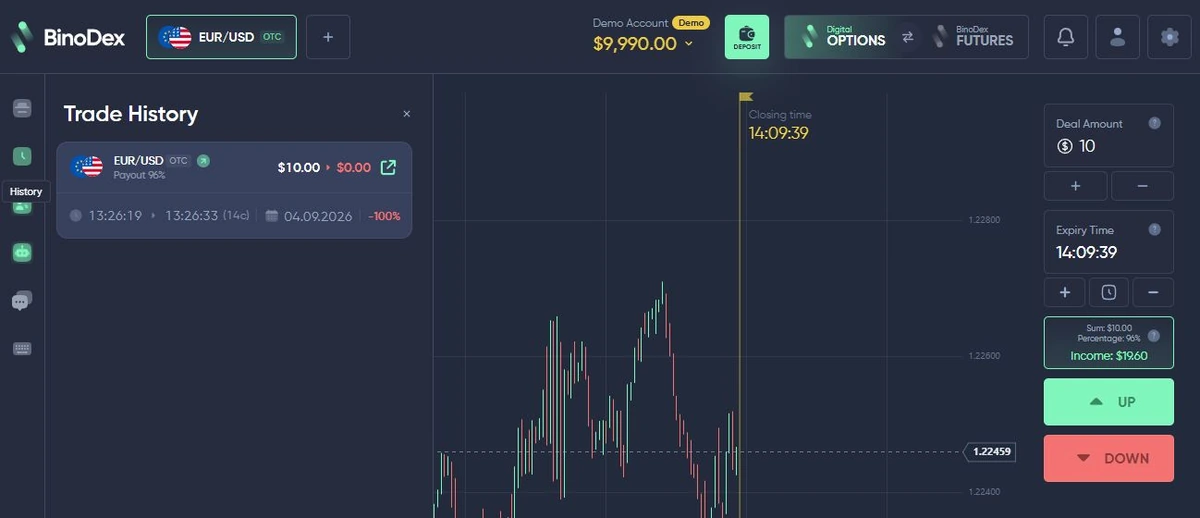
The terminal exposed asset selection, deal amount, expiry, current payout, chart tools and Up/Down controls. We also completed a $10 EUR/USD OTC demo trade and confirmed the finished order in history.
Demo trade completed · first-hand evidence
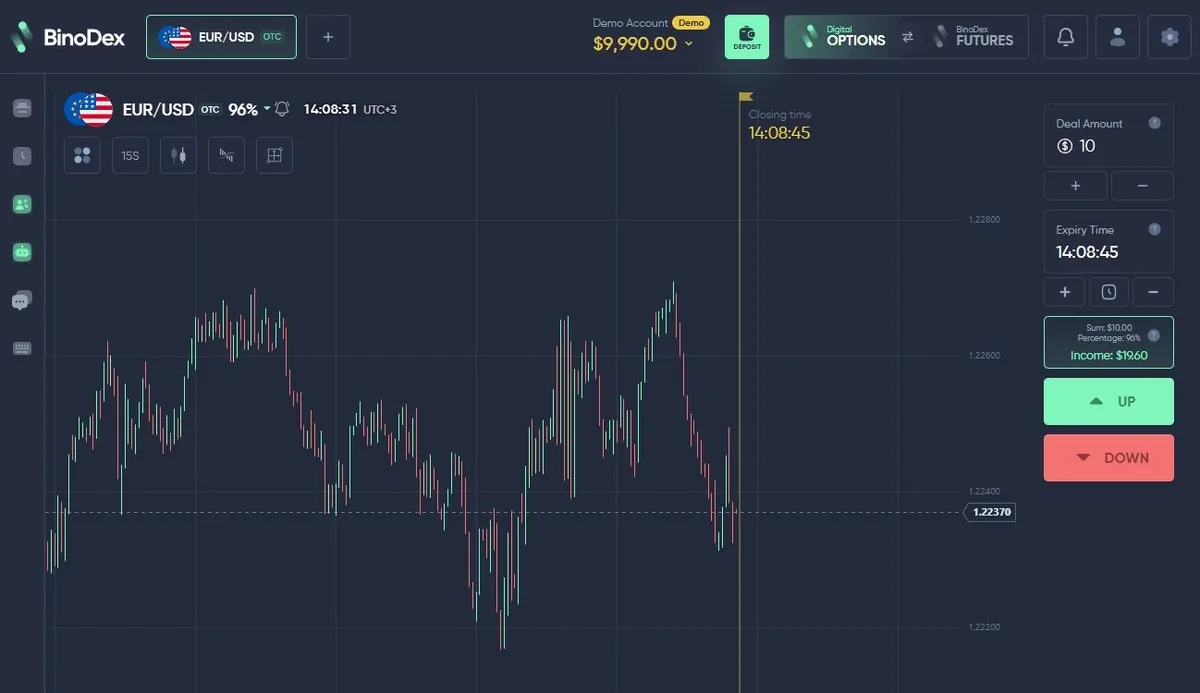
Inside the trading platform — 2:30 walkthrough
Watch the actual account-access screen, crypto-deposit choices, demo controls, trading history, AI Trading, Copy Trading and Futures. English captions are embedded in the video. We have not confirmed a real-money withdrawal.
This is a recorded interface walkthrough, not evidence of a completed deposit or withdrawal. Features and minimums can change.
How BinoDex Digital Options Work
The Digital Options workflow we checked follows a direct contract setup: choose an asset → set the amount → select expiry → review the displayed payout → choose Up or Down → open the trade → wait for settlement.
BinoDex currently markets Digital Options trading from $1 per trade. The current amount, expiry and payout should still be checked on the active ticket because they are product conditions rather than permanent site-wide constants.
Current source: BinoDex Digital Options product information.
Assets, OTC Markets and Dynamic Payouts
OTC-labelled instruments were part of the Digital Options product we tested. Several OTC currency pairs showed high payout values during that session, while later checks displayed different percentages on other instruments.
BinoDex currently markets payouts up to 96% and more than 150 assets. We treat that as a maximum marketing figure rather than a permanent payout on every trade.
The relevant number for a user is the payout shown on the active trade ticket.
BinoDex Expiry Times and Trade Controls
Expiry is part of the Digital Options contract setup. In our September 2026 demo session, the selector exposed 15 seconds, 30 seconds, 1, 2, 3, 4, 5, 15 and 30 minutes, plus 1 hour. The active expiry remained visible beside the deal amount and payout before the order was opened.
The same terminal included chart timeframe, chart type, multi-chart, indicator and drawing-tool controls. During our check, the indicator menu included SMA, EMA, MACD, RSI, Bollinger Bands, Ichimoku Cloud and SuperTrend, while the drawing tools included lines, rays, rectangles, channels, Fibonacci and Andrew’s Pitchfork.
These are values and tools observed in our checked session, not a guarantee that every asset or later platform version will expose the same choices.
Our Completed BinoDex Demo Trade
We completed a $10 EUR/USD OTC demo trade and followed it through the platform workflow until the result appeared in history.
The useful evidence is the sequence itself: trade setup, open position, expiry and completed order record. It demonstrates the Digital Options workflow rather than future trading performance.
Completed order confirmed in history
BinoDex Deposits, Crypto Networks and Minimums
The cashier we checked was strongly crypto-oriented and exposed token/network choices before payment. Minimums depended on the selected route rather than one universal account-wide number.
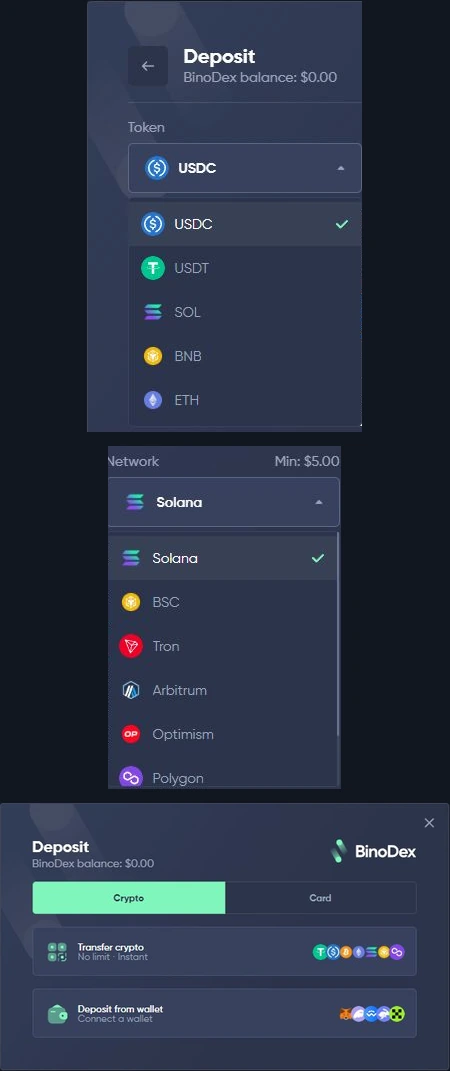
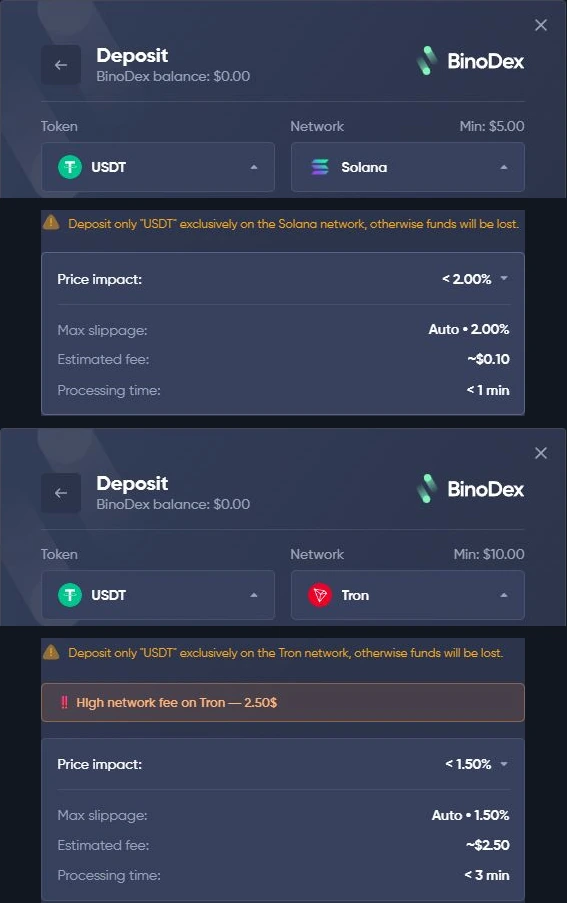
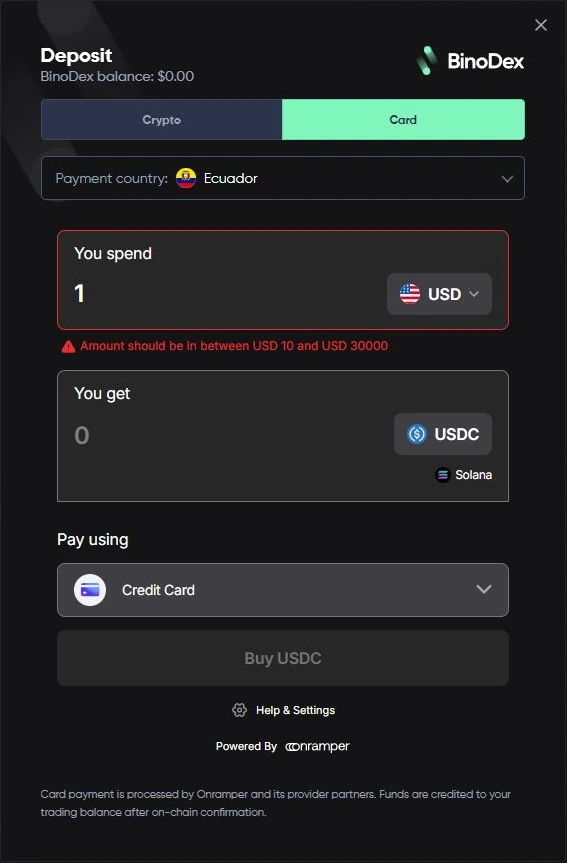
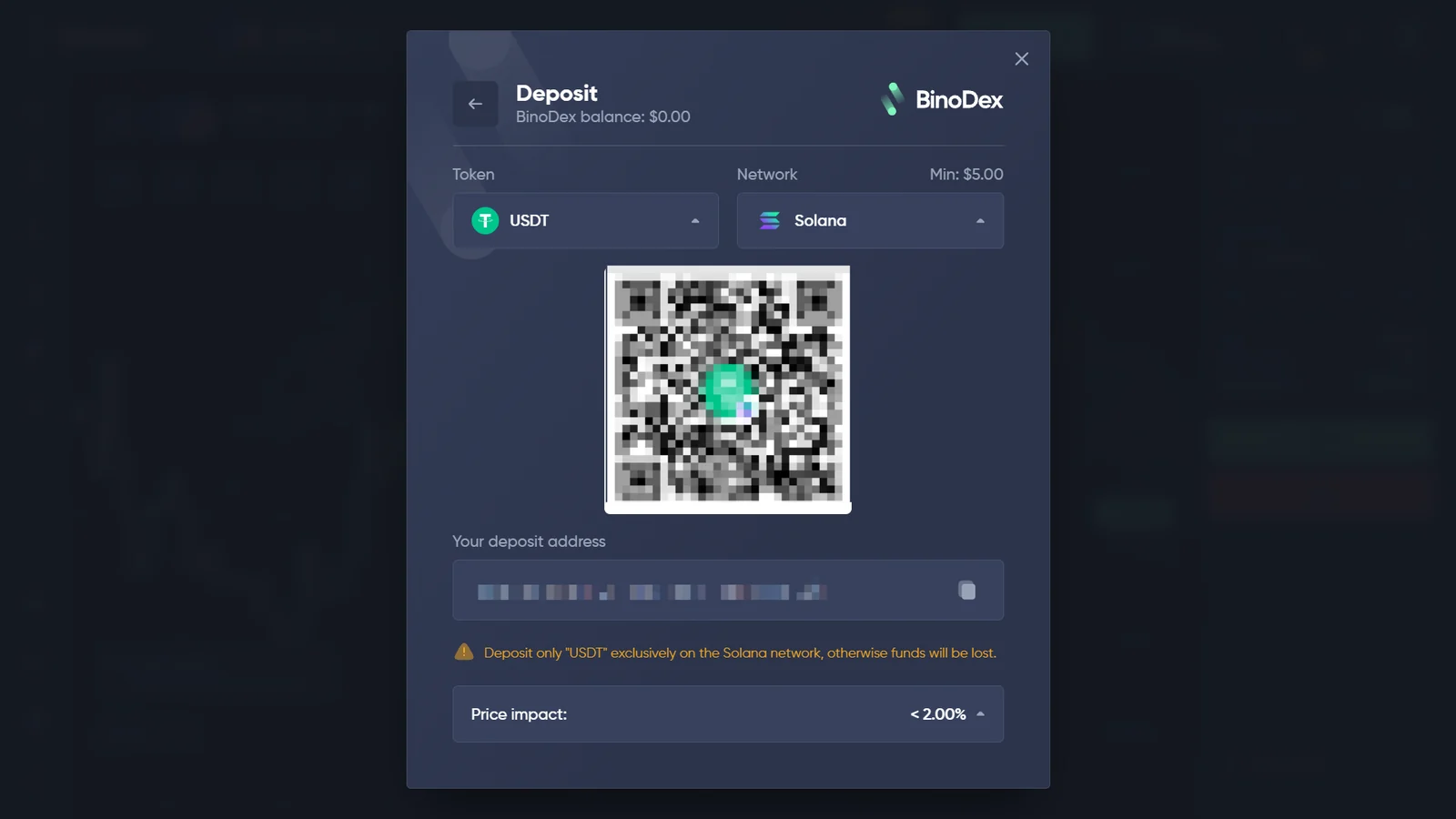
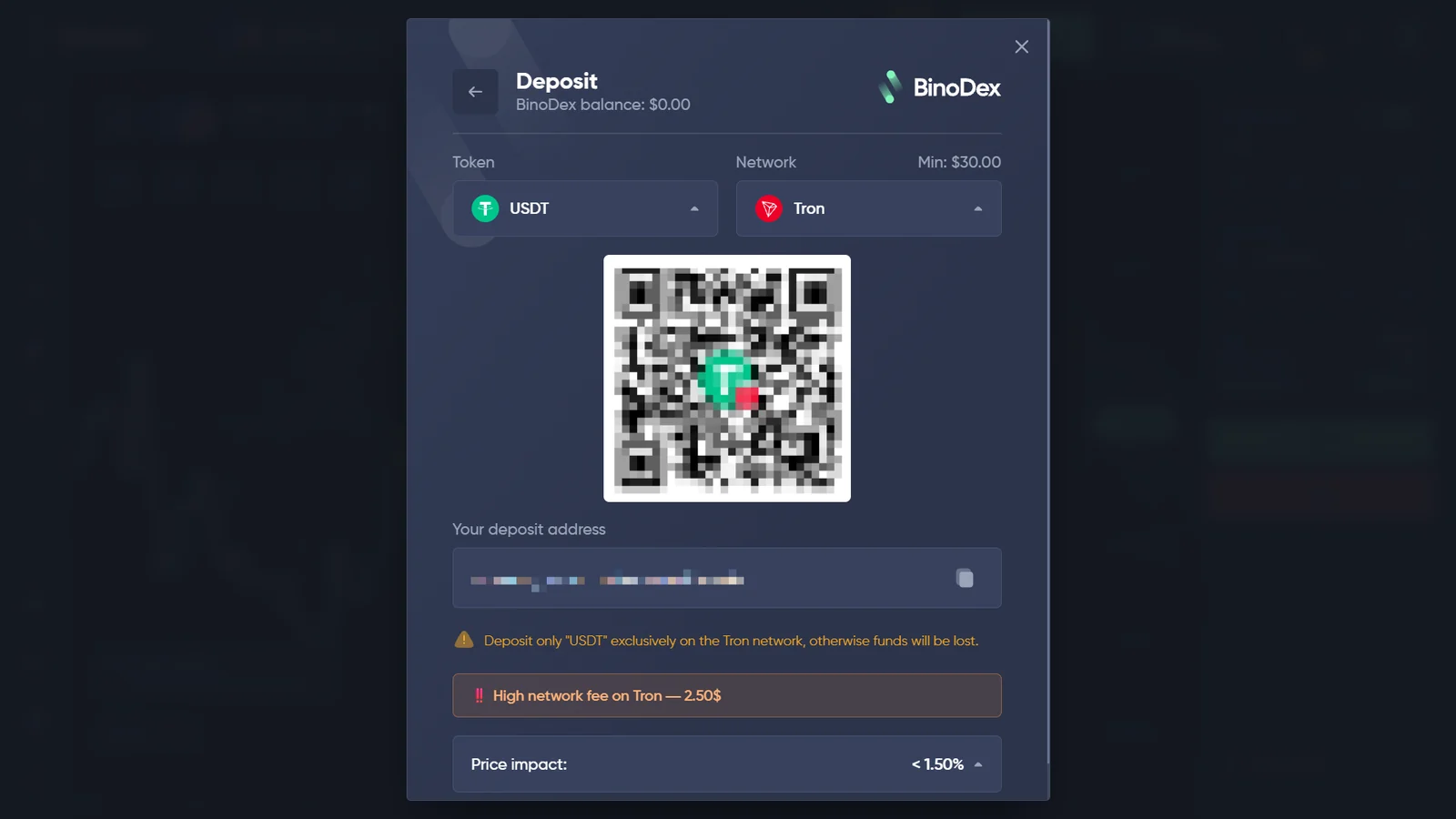
BinoDex has marketed funding from $5, but the actual minimum depends on the token, network and session. Our earlier cashier check showed $10 for USDT/Tron; our new 26 October 2026 capture shows $30 for USDT/Tron and $5 for USDT/Solana. The newer Tron screen also displayed a $2.50 network-fee warning. Always use the current network and amount shown in the live cashier rather than transferring to an address in an old screenshot.
BinoDex Withdrawals, Fees and Current Platform Claims
BinoDex currently markets fast or near-instant withdrawals and 0% platform fees. Those are platform marketing claims rather than measured withdrawal results from our account.
Our first-hand cashier evidence documents route-specific token, network, minimum and cost information. A blockchain network fee, payment-provider quote or conversion condition can still exist even where the platform advertises no platform fee.
Our 26 October screen recording also shows the Transfer crypto withdrawal form, including its token/network selection and a $5 minimum for the selected USDT/Tron route. This is a withdrawal-form minimum, not the same figure as the $30 deposit minimum shown for USDT/Tron in the cashier. We did not execute a withdrawal.
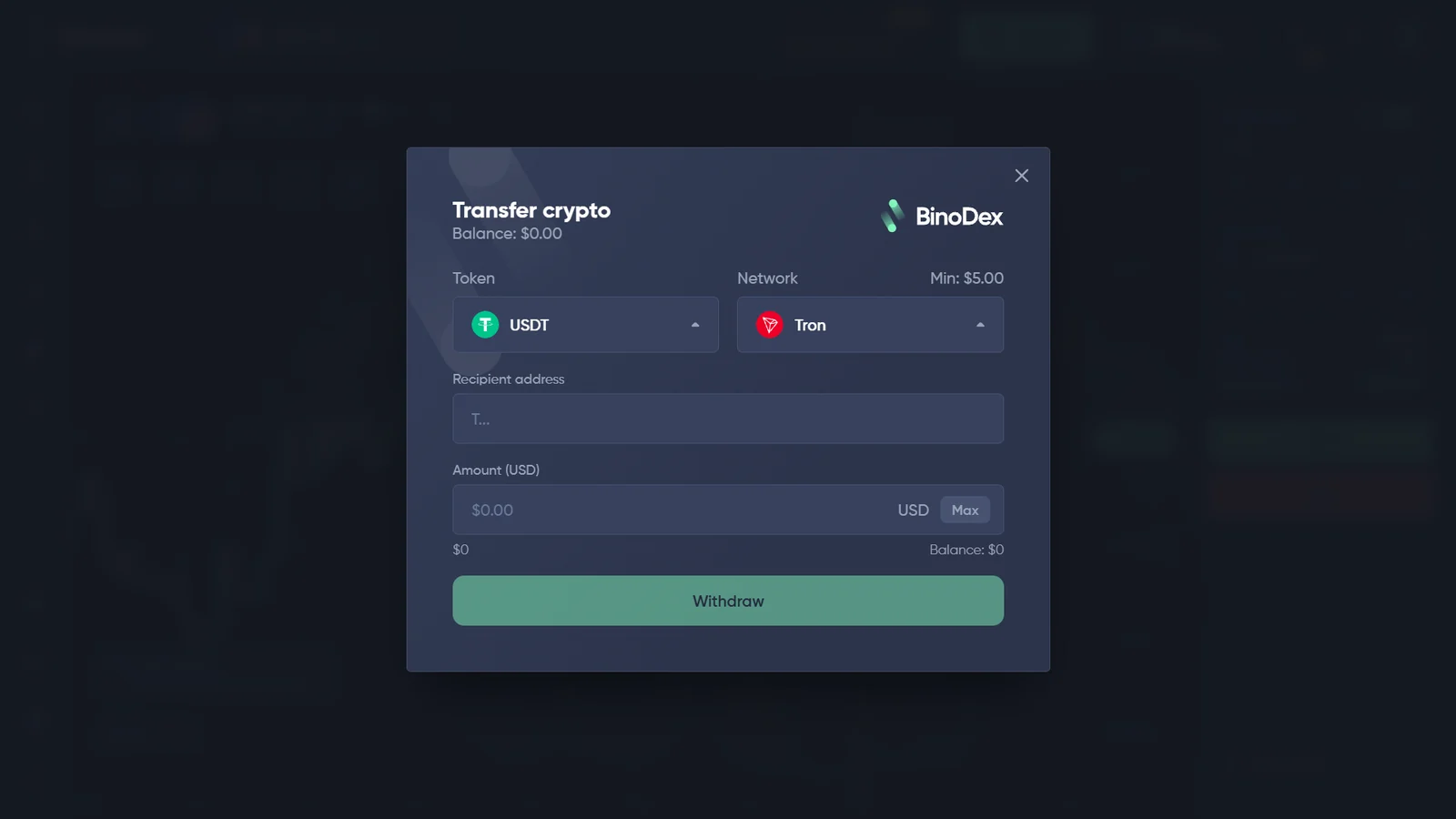
The useful check before funding is therefore the exact route and conditions shown in the current cashier.
Having a withdrawal problem? See our evidence and escalation guide for pending, rejected or missing withdrawals.
Before funding any trading account, see our platform verification checklist.
BinoDex KYC and Account Verification
BinoDex currently markets No KYC access, while also publishing AML/KYC documentation. Our checked account allowed registration, demo trading and cashier inspection before document submission.
The evidence supports a narrower statement: document verification was not required in the pre-funding flow we checked. Verification requirements can still depend on account state, compliance review or transaction flow.
BinoDex Futures: Long/Short, Margin and Leverage
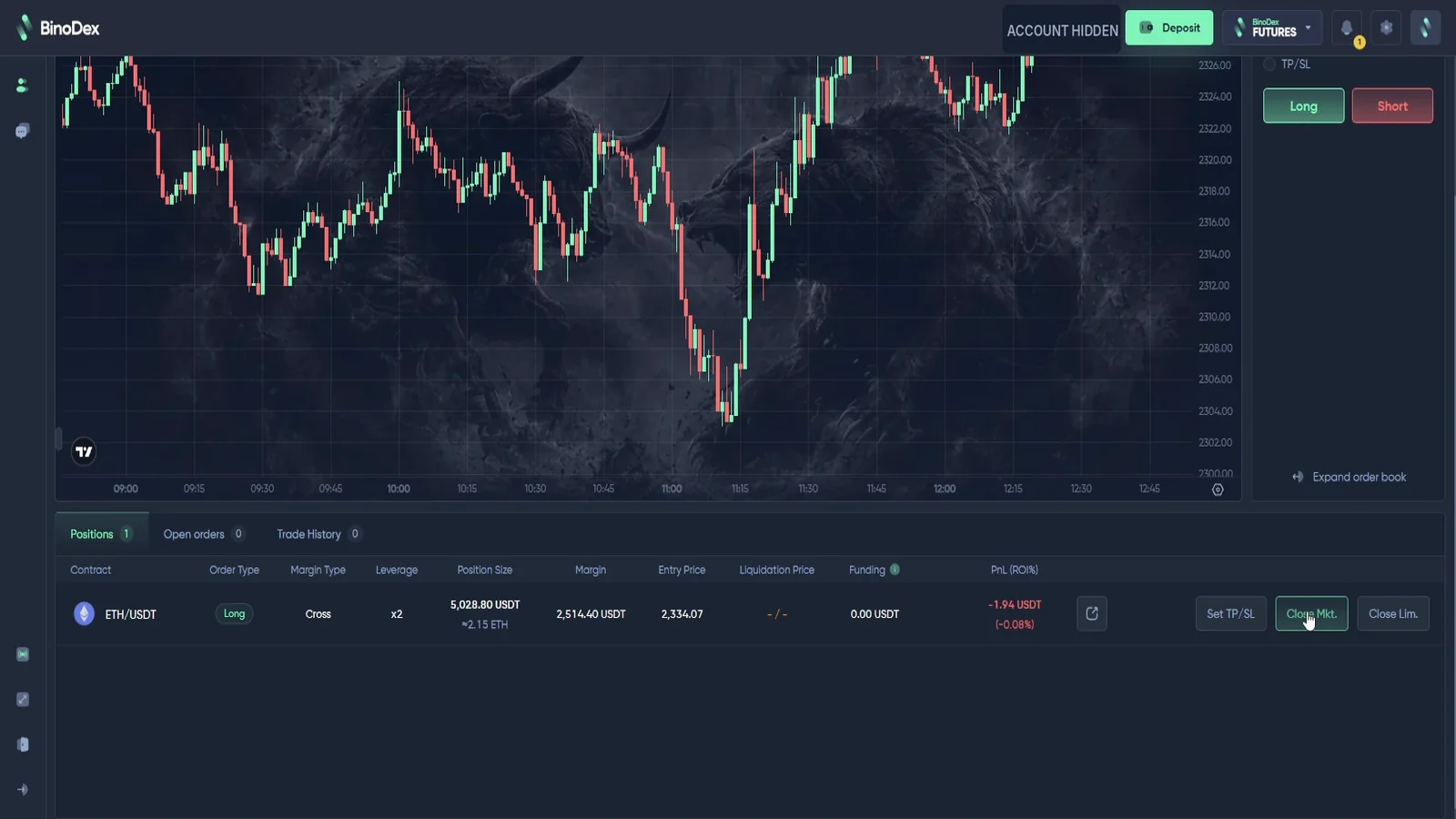
Perpetual Futures are part of the BinoDex ecosystem and are mechanically different from Digital Options. In our logged-in Futures session we observed ETHUSDT, Market and Limit order tabs, Buy/Long and Sell/Short controls, Cross and Isolated margin, TP/SL fields, liquidation information, funding and PnL/ROI.
The leverage selector we observed included values up to x150. BinoDex public marketing has advertised higher maximum leverage for selected markets; we keep the observed selector value separate from the marketing maximum.
BinoDex Copy Trading and AI Trading
These are two different platform features. Copy Trading shows a directory of traders and the entry amounts displayed for their profiles; AI Trading shows algorithm settings, risk-style controls, trade-size configuration and a stop-balance field. The presence of these controls does not establish profitability.
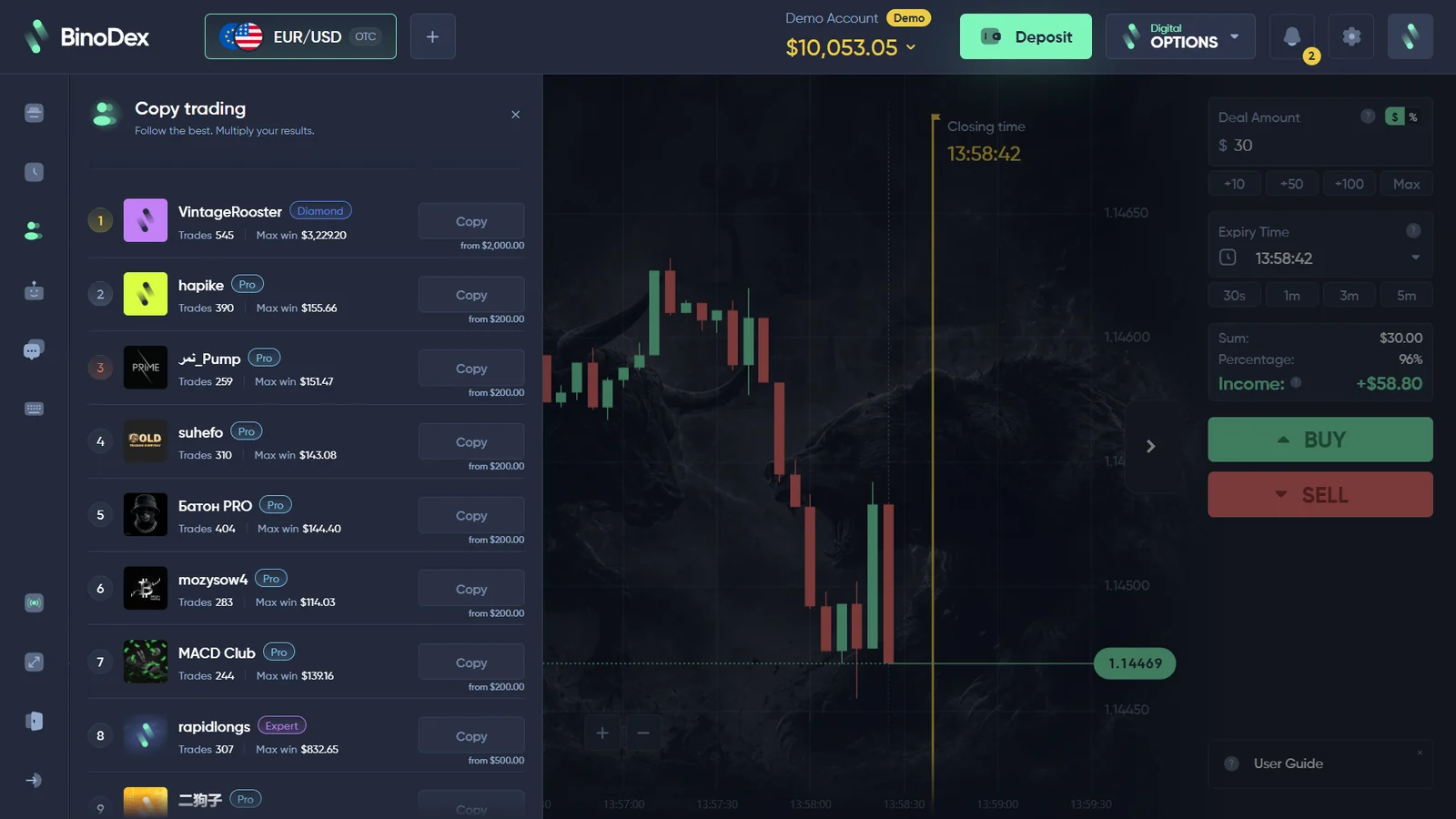
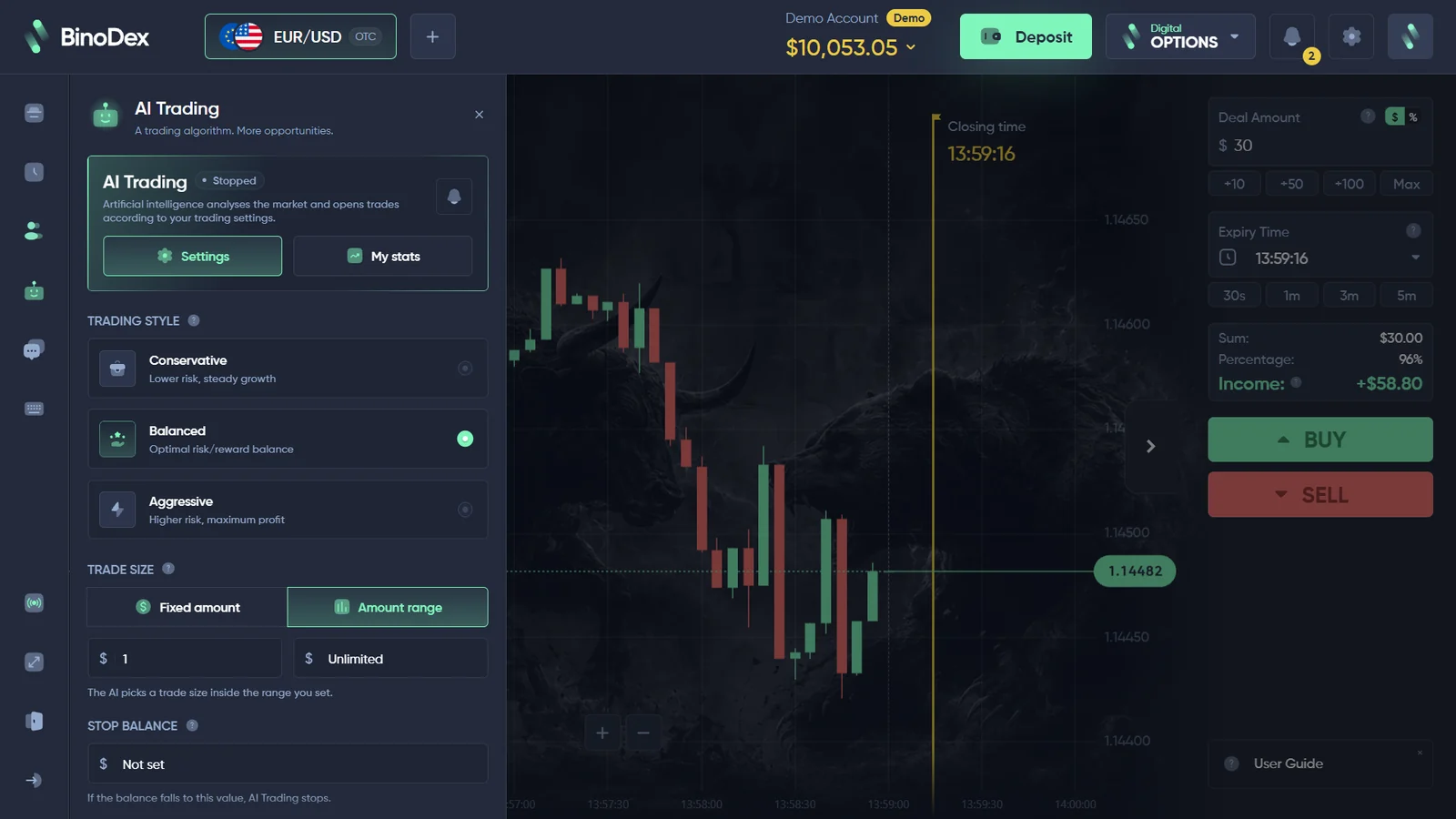
The displayed Copy Trading entry requirements and AI controls belong to the specific platform session we recorded. Check current eligibility and settings in your own account.
BinoDex Mobile App and Browser Access
The current Android trading app is listed on Google Play under BINODEX LIMITED for Android. BinoDex also provides browser-based access to its wider platform.
Store availability can change by device and region, so the current official distribution route should be checked on the device being used.
App source: BinoDex on Google Play.
Trading Risk and Product Differences
BinoDex combines several trading models in one ecosystem. Digital Options use a fixed-expiry directional contract, while perpetual Futures add leverage, margin, liquidation and funding. Copy Trading and AI Trading are separate account features again.
Displayed payout percentages do not predict whether a Digital Options trade will succeed, and leverage can magnify Futures losses. Check which services are available in your country before funding an account. A UK company registration is not proof of authorization to offer financial services; the Bank of Russia also published a warning on 16 July 2026 concerning BINODEX and specific named web properties. This record should be assessed for its precise scope, not used to label every similarly named URL. See Responsible Trading for the broader risk framework used by DigitalOptions.co.
How We Checked BinoDex
Our BinoDex evidence comes from logged-in platform checks rather than only the public landing page. The checks covered the Digital Options demo terminal, OTC assets, amount and expiry controls, dynamic payout display, completed demo trade and history, cashier routes, route-specific minimums, a card quote, Futures, Copy Trading and AI Trading.
Current BinoDex sources are used separately for marketing claims, app availability and corporate information. See How We Verify for the evidence model used across DigitalOptions.co.
BinoDex FAQ
Does BinoDex offer Digital Options or binary options?
BinoDex labels the product Digital Options. The interface we checked uses an asset, amount, expiry and Up/Down direction, which is why users also search for BinoDex binary options.
Does BinoDex have a demo account?
Yes. The demo account we checked displayed $10,000 in virtual funds, and we completed a $10 EUR/USD OTC demo trade.
What is the minimum BinoDex trade?
BinoDex currently markets Digital Options trading from $1 per trade. The active ticket should be checked for current limits.
What is the minimum BinoDex deposit?
Minimums depend on the network and date. Our 26 October 2026 screens show USDT/Solana at $5 and USDT/Tron at $30; earlier USDT/Tron evidence showed $10. Confirm the live cashier before paying.
What payout does BinoDex offer?
BinoDex currently advertises Digital Options payouts up to 96%, but our platform checks showed that displayed payout percentages vary by asset and session.
Does BinoDex require KYC?
The pre-funding account flow we checked did not require document submission. BinoDex also publishes AML/KYC documentation, so verification can depend on the current account state and transaction flow.
Does BinoDex have Futures?
Yes. We observed perpetual Futures inside the logged-in BinoDex ecosystem, including Long/Short, margin, TP/SL and leverage controls.
How do I find the BinoDex official site and sign up?
Use the account-access screen of the platform you intend to join. Our original capture shows email, Google and wallet options. The Open BinoDex button on this independent guide uses an affiliate redirect; check the destination before entering account information.
Current BinoDex platform check
Check the current BinoDex ticket, payout, expiry and cashier conditions before opening a trade.
Our evidence documents the account and platform conditions checked in September–October 2026. Dynamic payouts, payment routes and availability can change.