AFFSTORE · IQ OPTION · EXNOVA
IQ Option & Exnova Affiliate Programs
One publisher account, two active broker Revenue Share offers. Explore commission models, real dashboard screenshots, tracking and payout setup before joining Affstore.
 ORIGINAL PARTNER DASHBOARD
PARTNER PROGRAM OVERVIEW
Affstore Connects IQ Option and Exnova Publishers
Affstore is an affiliate-management platform where website owners, video creators and other traffic publishers can select trading-related partner offers, generate tracking links and see the results in one account. The two core broker offers in this walkthrough are IQ Option and Exnova. They share the Affstore reporting infrastructure, yet have different advertised commission ceilings and product audiences.
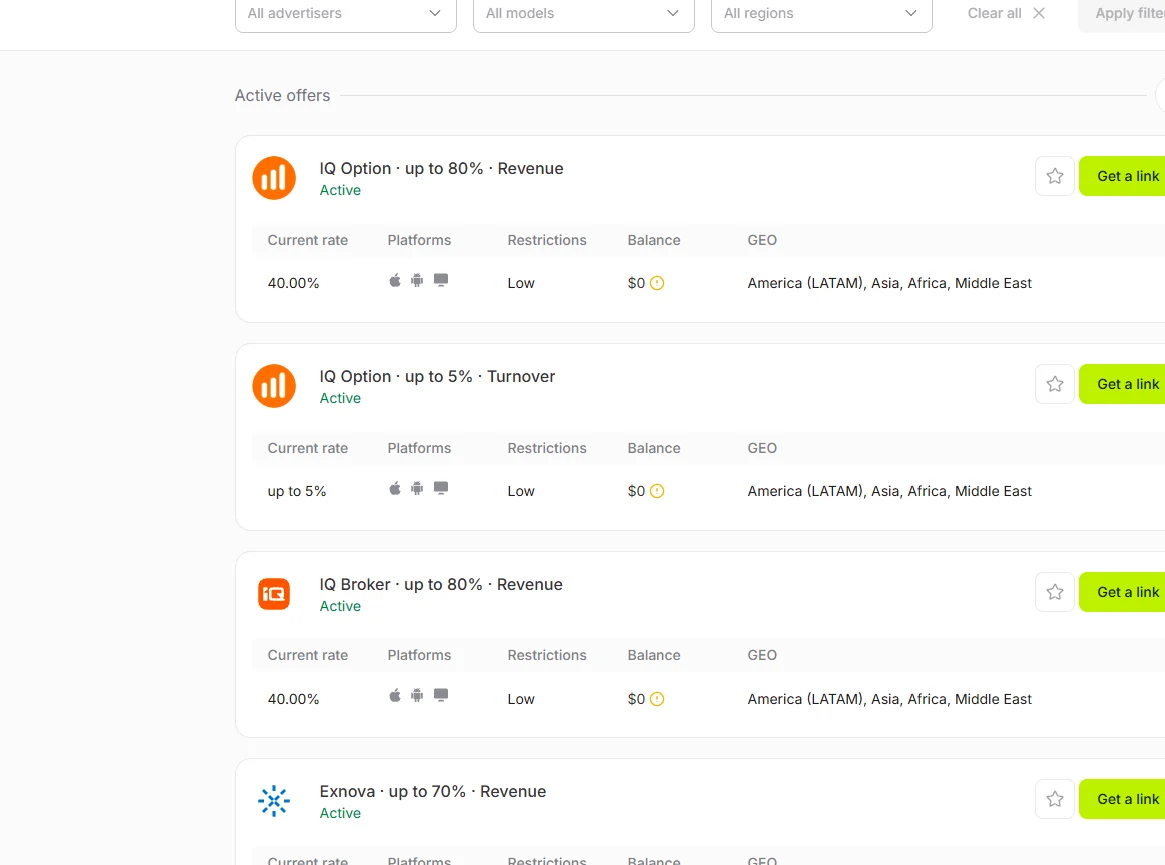
The key distinction is between the maximum advertised rate and the current rate actually displayed in the account. In the screenshots taken on 13 November 2026, the active IQ Option and Exnova Revenue Share offers both show a current rate of 40%. Their advertised maximums differ. An affiliate evaluating a new program should know both numbers, not only the largest percentage in a marketing banner.
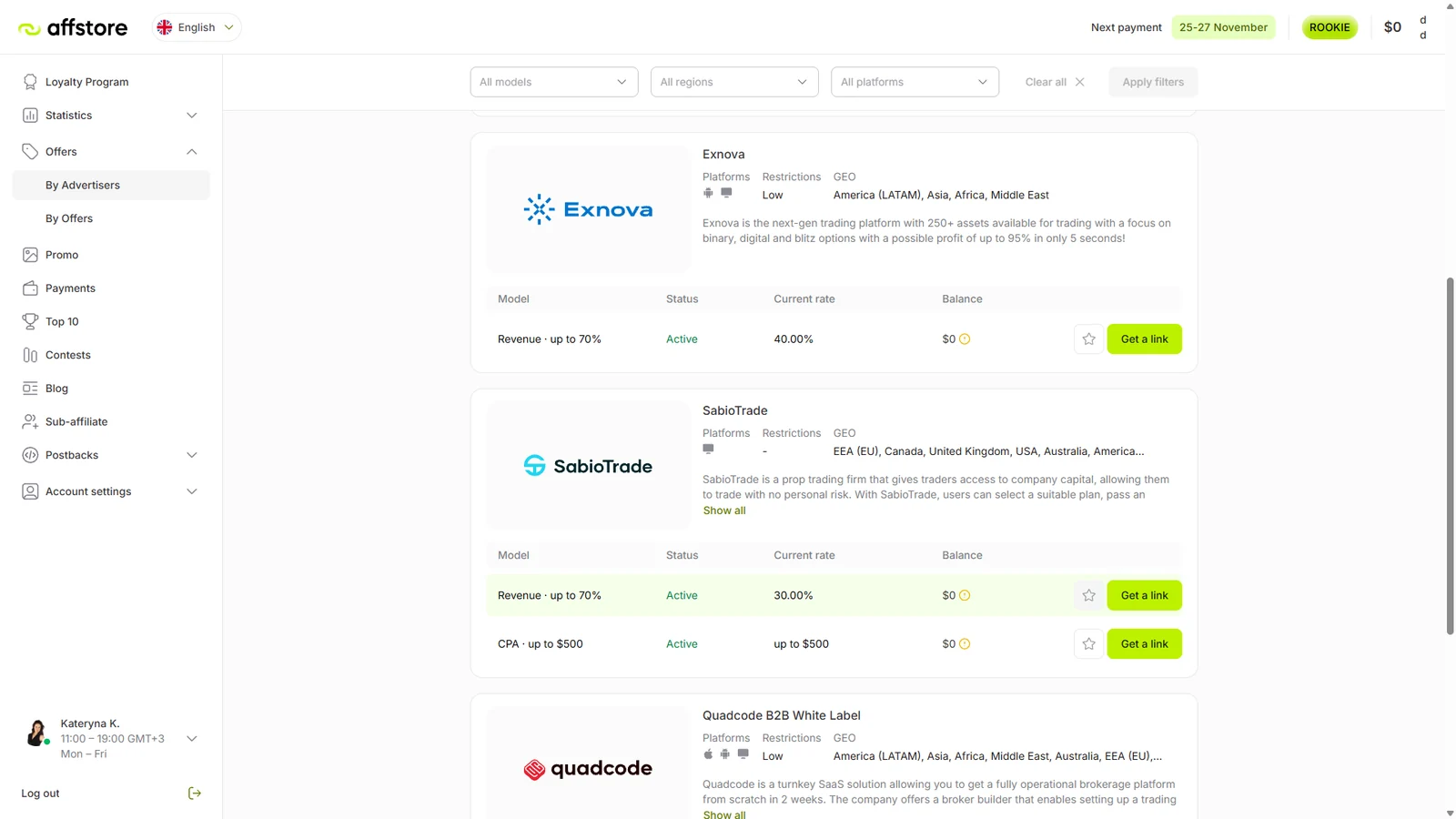
The screenshots also show additional offers, including IQ Broker, SabioTrade and Quadcode. They are separate opportunities inside the wider network, not additional broker partners being compared in this IQ Option and Exnova guide. That keeps the page focused on the audiences most likely to search for these two affiliate programs.
ACTUAL OFFERS IN THE ACCOUNT
IQ Option vs Exnova: Rates, Models and Eligible Offers
Affstore lists offers individually rather than assigning every publisher a single global commission figure. The screenshot below contains real offer cards, current percentages, maximum rates, GEO information, status and the option to generate a link. Compare the trading brand and the payment model together.
| Offer | Screenshot rate | Advertised maximum | Status in account |
|---|---|---|---|
| IQ Option · Revenue Share | 40% | Up to 80% | Active |
| IQ Option · Turnover | Offer-dependent | Up to 5% | Active |
| IQ Option · CPA | Not assigned | Up to $120 | Inactive / activation offered |
| Exnova · Revenue Share | 40% | Up to 70% | Active |
These are observed settings of one partner account, not a claim that all new members start at 40%. A second IQ Option Europe CPA offer is listed separately at $200 but inactive for this account. That is a different regional offer, not an automatic replacement for the standard IQ Option CPA route.
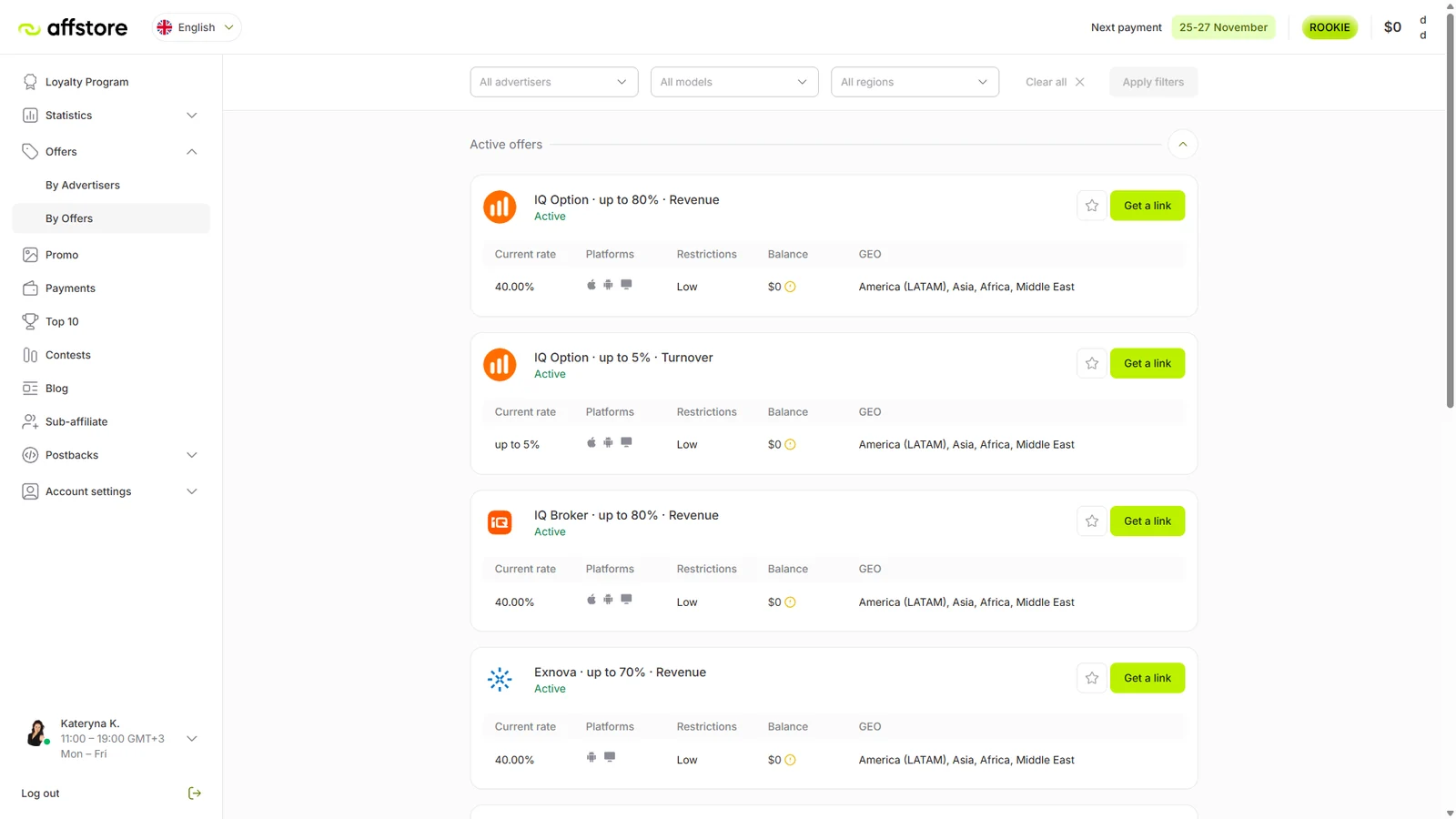
GEO selection matters: the IQ Option and Exnova offer rows shown here list Latin America, Asia, Africa and the Middle East. The separate Europe-oriented offer has a distinct region and status. A traffic source or country must be matched to the particular offer used to build the link.
Promote the broker offer that fits your audience.
Choose an eligible publisher offer, then create its tracked link inside Affstore.
COMMISSION MECHANICS
RevShare, Turnover and CPA — What the Percentages Mean
Revenue Share is a share of a defined revenue figure attributable to referred traders, calculated under the offer terms. A displayed 40% rate is not a payment equal to 40% of all deposits, and the upper headline of 80% is not automatically assigned to every account. Turnover Share uses eligible trading volume as its calculation base. CPA is a fixed reward for a qualifying acquisition event, if that offer is active and approved for the campaign.
That difference changes the decision for a publisher. A content site attracting readers who continue using a platform may prefer to test Revenue Share; a campaign with predictable qualification economics may compare CPA, when access has been granted. But a 5% turnover rate cannot be compared numerically with 40% Revenue Share until the underlying calculation base is known.
Why the current 40% rate is more useful than a headline maximum
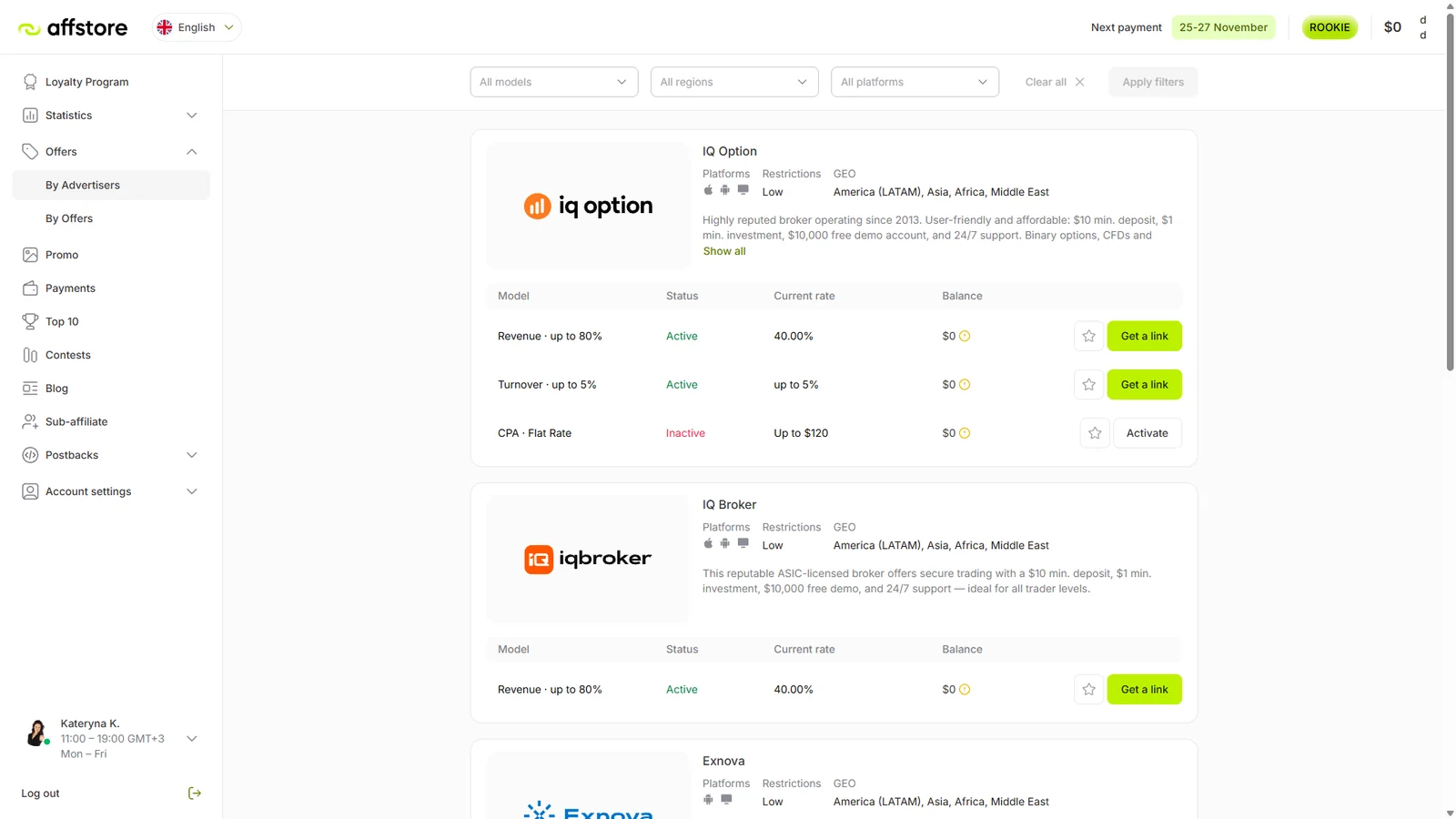
In the captured Affstore account, the publisher is in the Rookie loyalty category. An active 40% Revenue Share entry provides a concrete starting point for understanding that particular account. The advertised maximums remain relevant to experienced publishers, but the dashboard rate is the more immediately actionable value when comparing campaigns today.
Exnova is also active at 40% in the screenshots, with a 70% advertised maximum. Its offer has a different maximum from IQ Option even though the current percentages match. This is exactly why the two brands should appear in the same side-by-side commission table rather than as interchangeable programs.
PUBLISHER ACCOUNT SETUP
How to Register with Affstore and Activate a Broker Offer
- Open the partner registration. Create an Affstore account using the publisher signup form. The form asks for an email and password and acceptance of the program terms.
- Complete your account and traffic details. Make sure your website, content channels or other traffic methods are accurately represented in the account settings before requesting an offer.
- Open Offers. Compare IQ Option and Exnova Revenue Share options and their GEO restrictions. An inactive CPA item needs a separate activation step rather than assuming its maximum is available by default.
- Generate the matching partner link. Select the approved model and the appropriate landing page or promotion, keeping separate tracking identifiers for different traffic sources.
- Monitor registrations and FTD. Use the Statistics report to assess which link is producing qualified traffic and commission results.
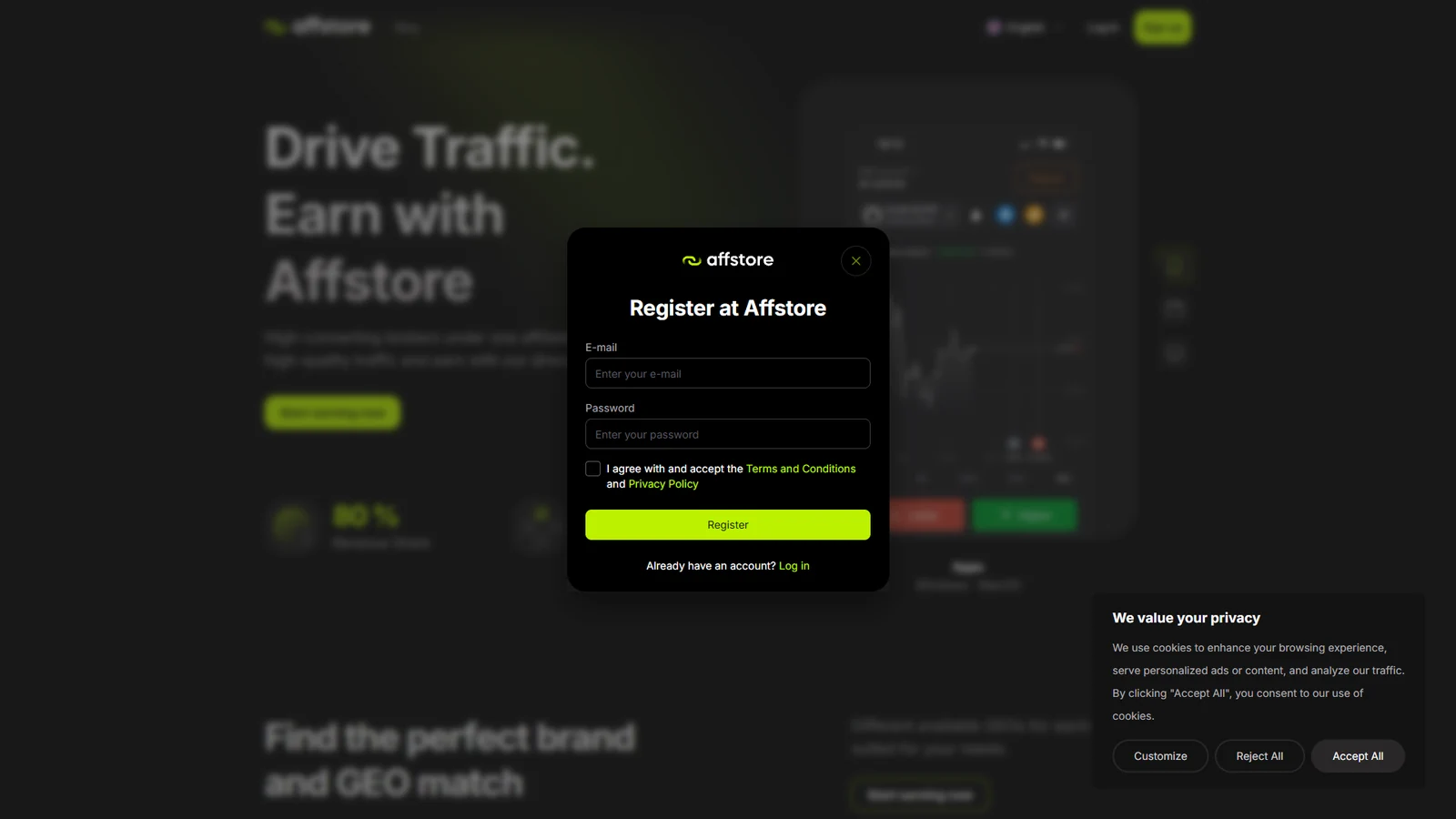
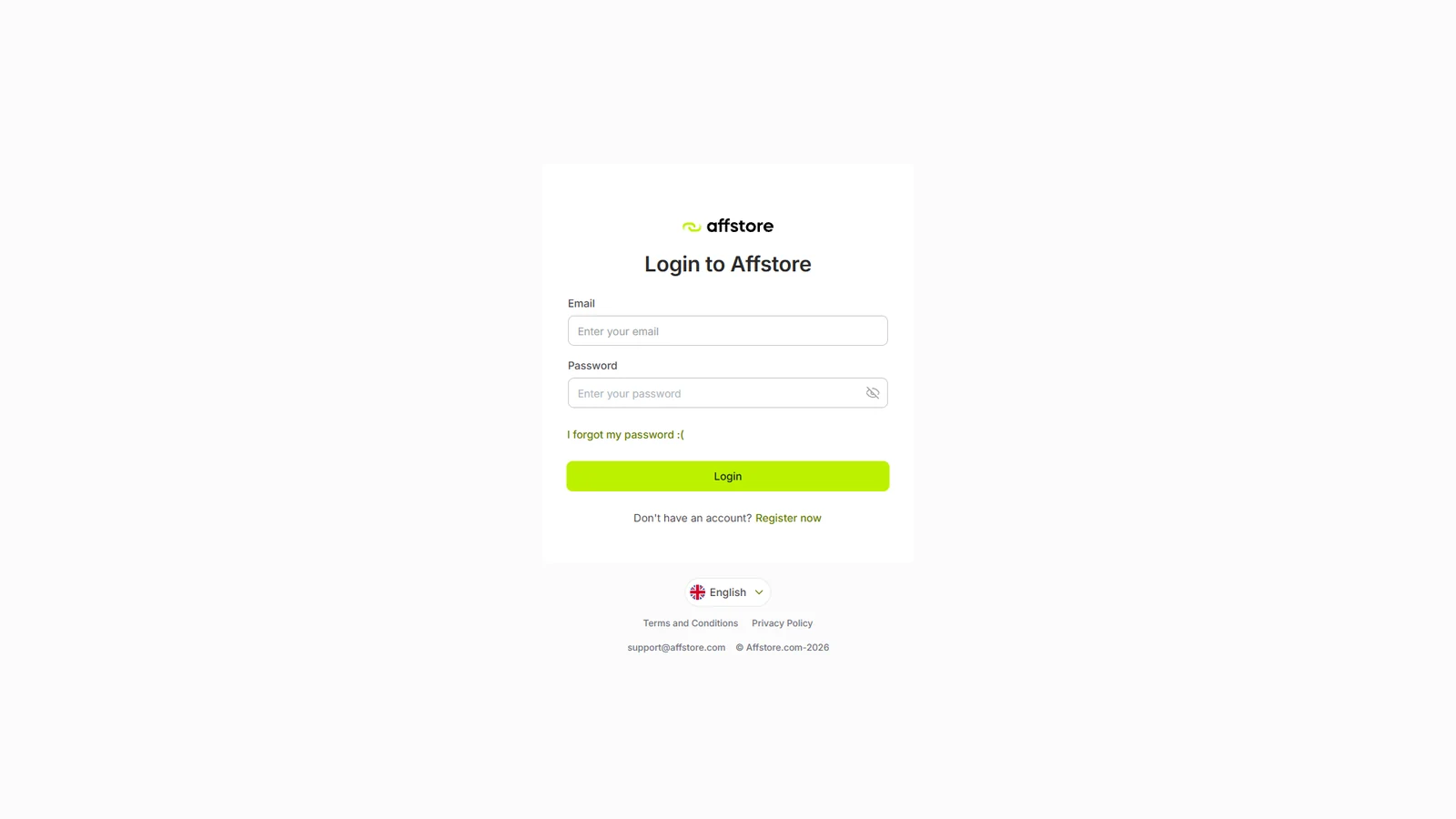
Registration and login are different intents: the registration form is for new publishers; the login page is for an existing Affstore account. Both are illustrated here without creating separate low-value SEO pages.
CAMPAIGN MATERIALS
Landing Pages, Banners and Links for IQ Option Traffic
The Promo area includes landing-page, banner and video tabs. In the screenshot, the landing-page library can be filtered by advertiser, commission model and language. Visible examples include IQ Option mobile and desktop landing experiences, plus an IQ Option Europe registration frame. The availability of each promotion should be checked against its matching offer and target region.
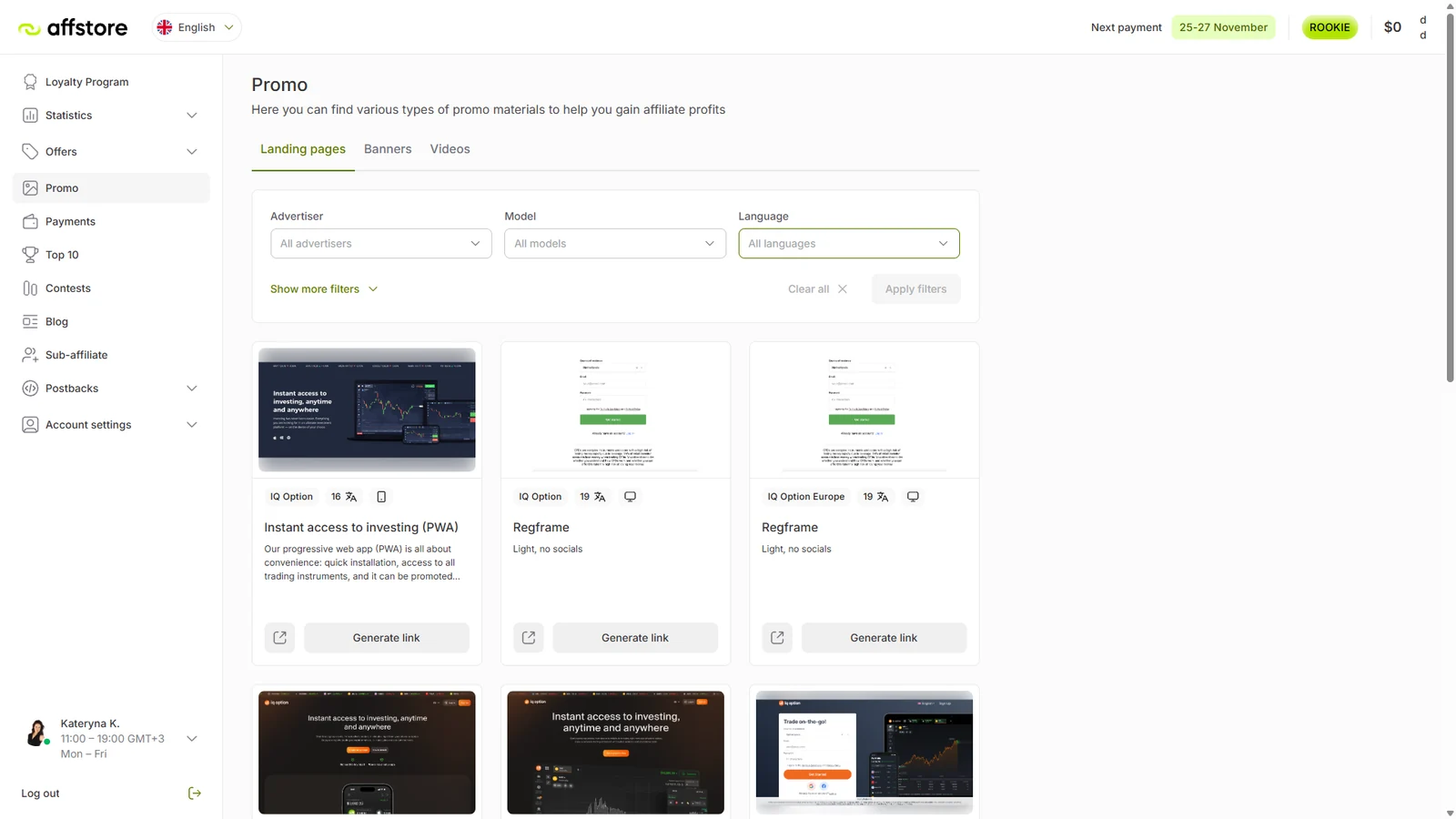
For a publisher running several content formats, one campaign might come from an English IQ Option tutorial and another from a market comparison. Giving them distinct tracking identifiers makes the next reporting step meaningful. This is more useful than directing all visitors to a single unmeasured link.
Ready to build an IQ Option or Exnova campaign?
Join the publisher program and select the suitable offer in your account.
MEASURE YOUR TRAFFIC
Tracking Registrations, FTD, Deposits and Profit
The Affstore Statistics screen provides more than an aggregate click count. The captured General statistics table includes Unique visitors, Installs, Registrations, FTD, Deposits and Profit. Reports can be filtered by period and Afftrack, grouped by day, and exported as XLSX or CSV. Column selection makes it possible to concentrate on the metrics that matter for a particular campaign.
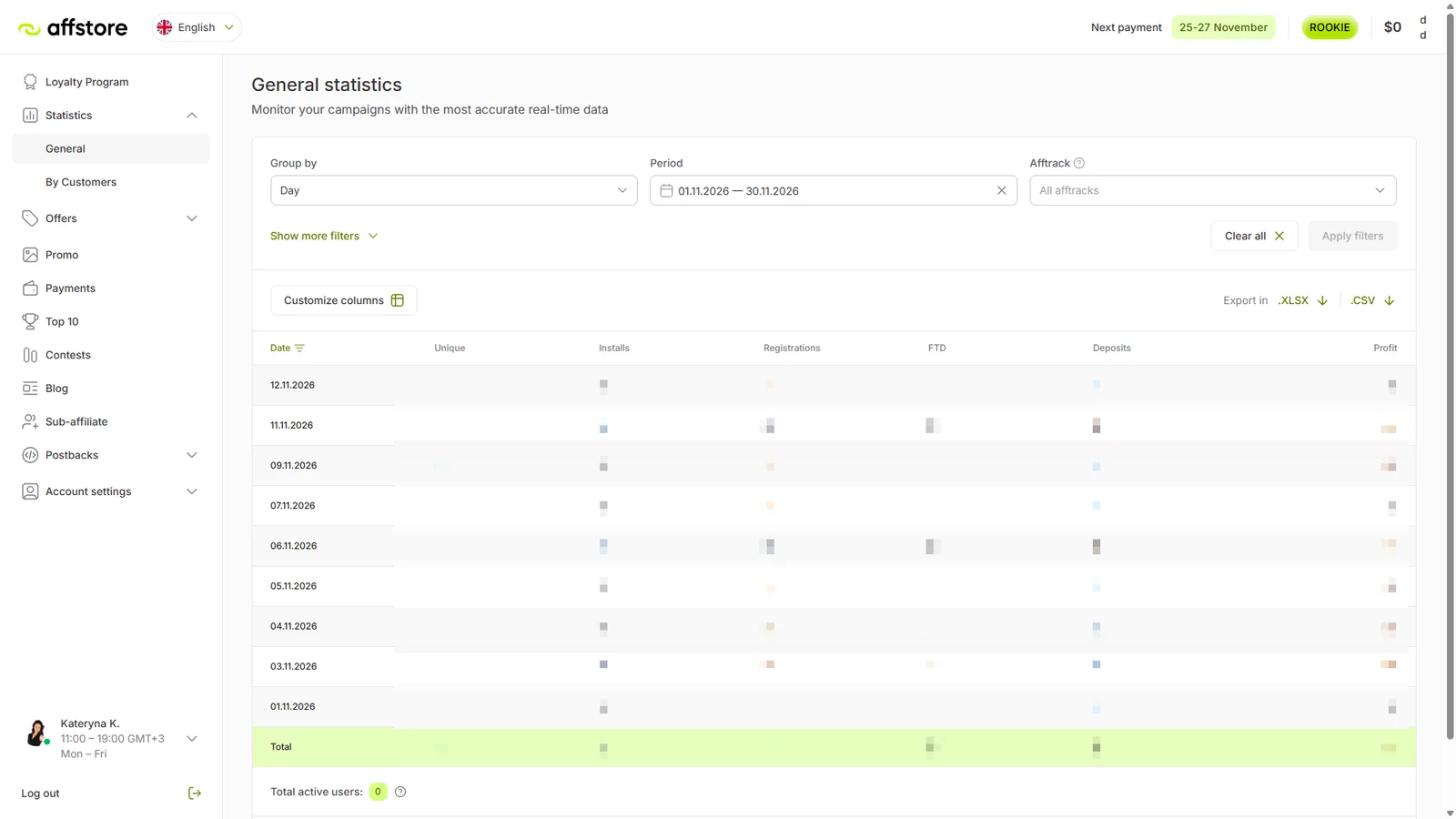
A simple publisher comparison
Consider two pages sending visitors to different offers. One may attract more clicks but fewer qualified first-time depositors; the other may attract fewer visitors but produce more FTDs. Keeping the campaigns separate in the Afftrack parameter makes that difference visible. An affiliate can then improve the landing-page match, copy or audience focus instead of judging performance by clicks alone.
The screenshots have anonymized account performance figures. They verify that the reporting fields exist, but they do not establish a public average conversion rate or a guaranteed income figure. For that reason the useful lesson is how to read the dashboard, not an invented earnings case study.
PAYOUT WORKFLOW
Affstore Payments: Minimums, Methods and Next Payout
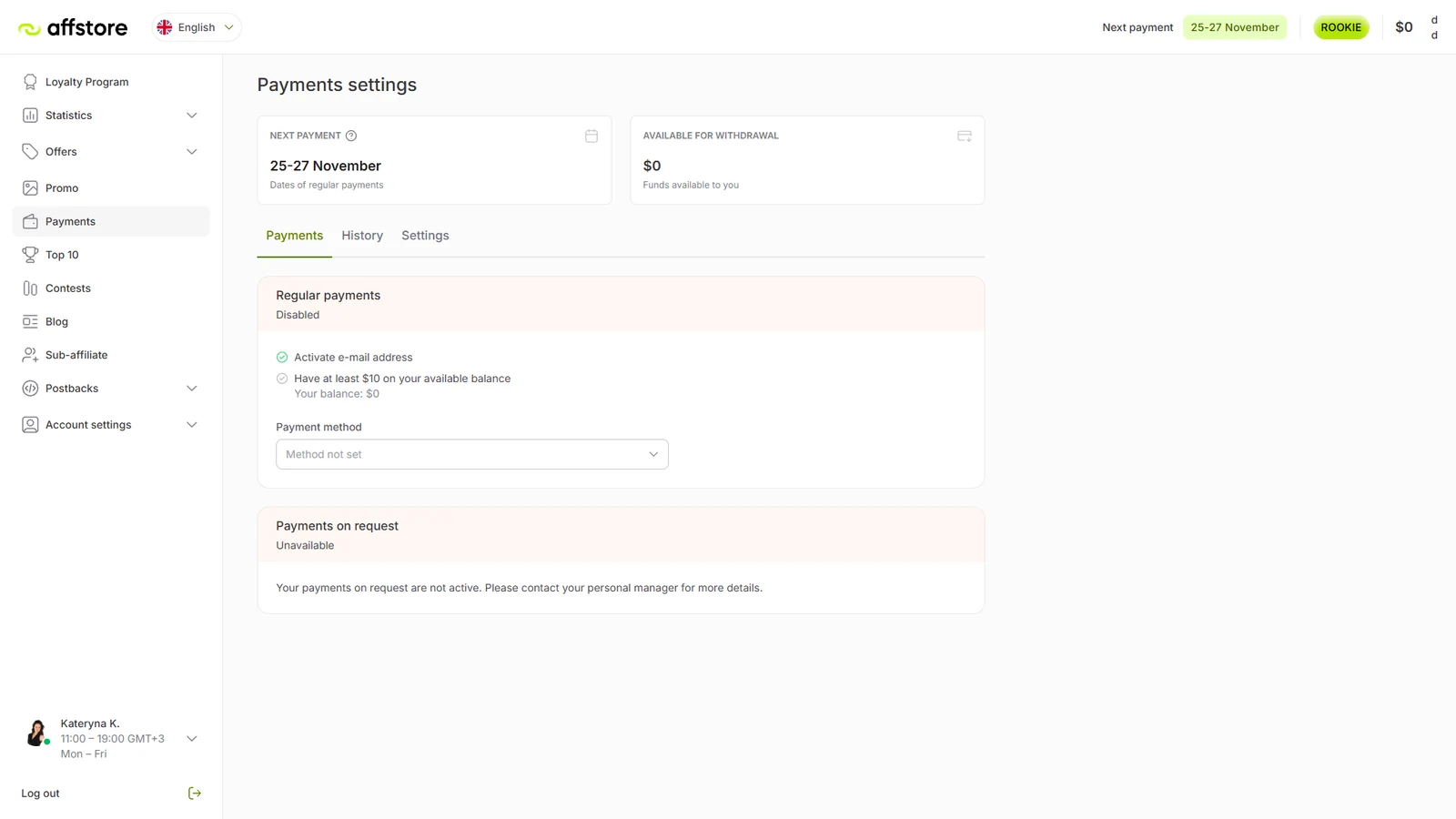
Affstore schedules regular affiliate payouts twice a month. The Payments screen separates regular payments, payments on request, method settings and payment history. In the captured account, the next regular payment window appears as 25–27 November 2026. The regular-payment option is not yet enabled because the account has not completed its setup and available-balance requirements. The on-request payment feature is marked unavailable and refers the affiliate to the personal manager.
For regular payouts, the screen lists $10 in available balance among the activation checks, alongside confirming the email and setting a payment method. This does not mean every payment method has a $10 minimum. The method settings screen shows different limits and fees by payout route, and on-request withdrawal limits can be higher.
Which payout methods are visible?
The displayed method selector includes WebMoney, PIX, Skrill, Wire Transfer, Neteller, Bitcoin, Volet and USDT. Some payment routes have different regular and requested withdrawal thresholds, so the exact minimum should be read from the selected method before completing setup. The dashboard also displays any applicable transfer fee in the payment-method details.
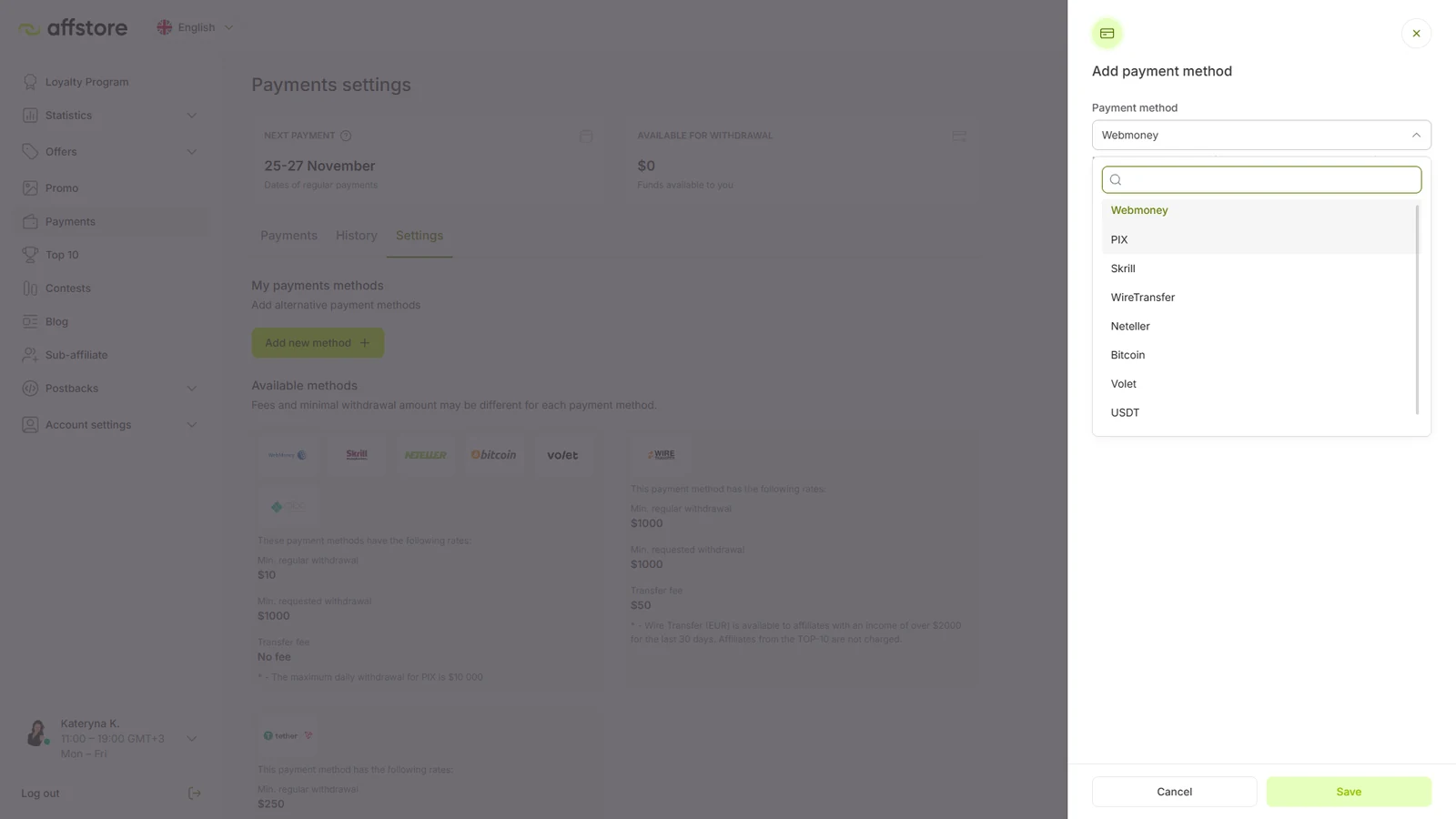
For a new affiliate, the practical sequence is: confirm your email, choose the payment route, enter the required account details, then meet the applicable payout threshold. A scheduled payment window and a requested withdrawal are two distinct operations in the interface. The current Rookie account does not have daily payouts automatically activated.
Manage commissions in one partner dashboard.
Create an Affstore publisher account and configure your own payout method.
ACCOUNT GROWTH
Loyalty Tiers and Sub-Affiliate Income
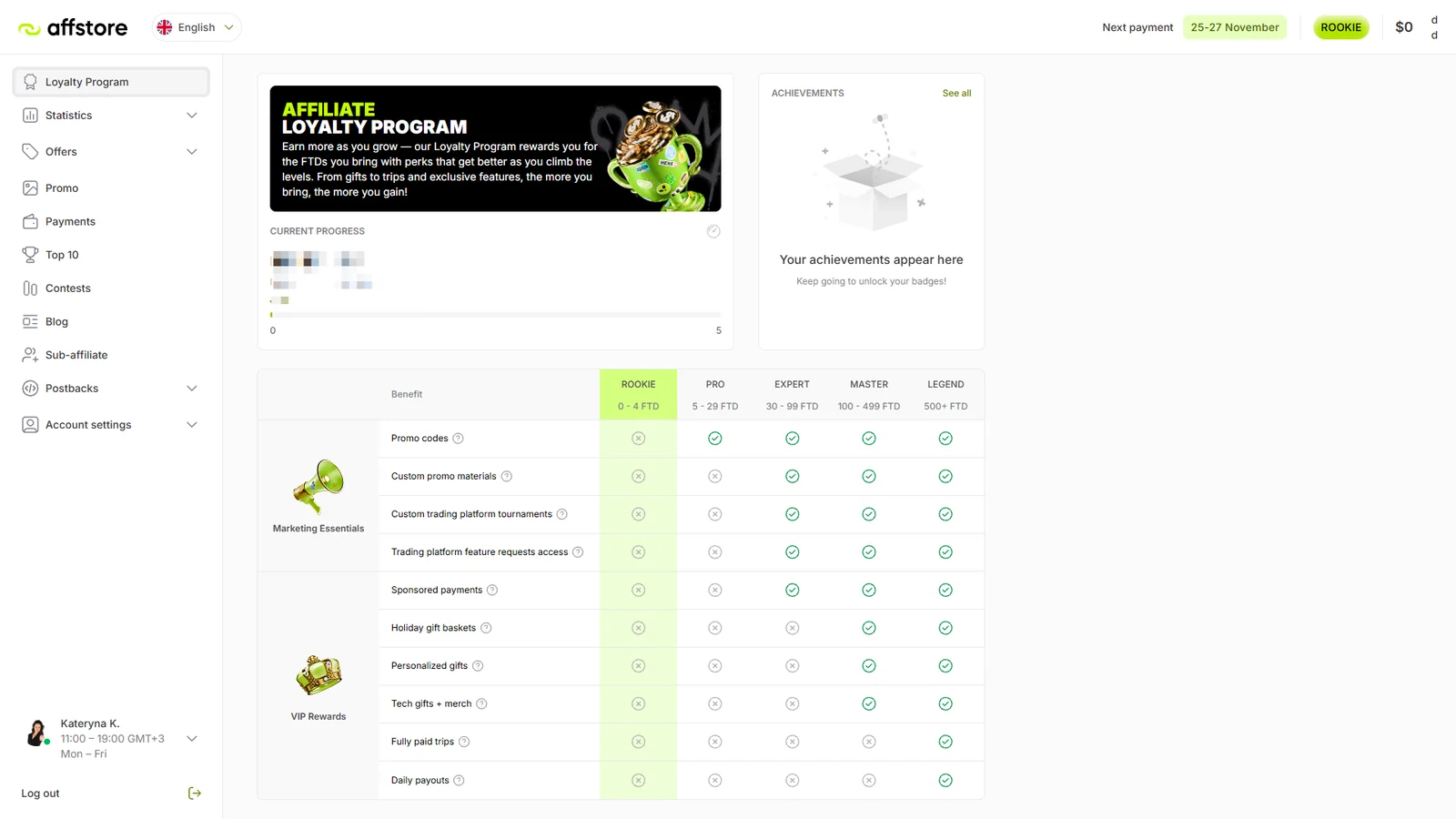
The loyalty screen includes five levels and their first-time-depositor ranges. The account shown is Rookie, but the benefits table lets publishers see what becomes available as their qualified traffic grows. This makes Affstore different from a simple, fixed-rate registration link: the platform combines commissions with progress-based benefits such as custom promotional support and prizes.
| Affstore level | FTD range displayed | Examples of higher-level benefits |
|---|---|---|
| Rookie | 0–4 FTD | Entry-level account |
| Pro | 5–29 FTD | Additional marketing benefits |
| Expert | 30–99 FTD | Custom promotion options |
| Master | 100–499 FTD | Expanded partner benefits |
| Legend | 500+ FTD | Daily payouts listed in benefits table |
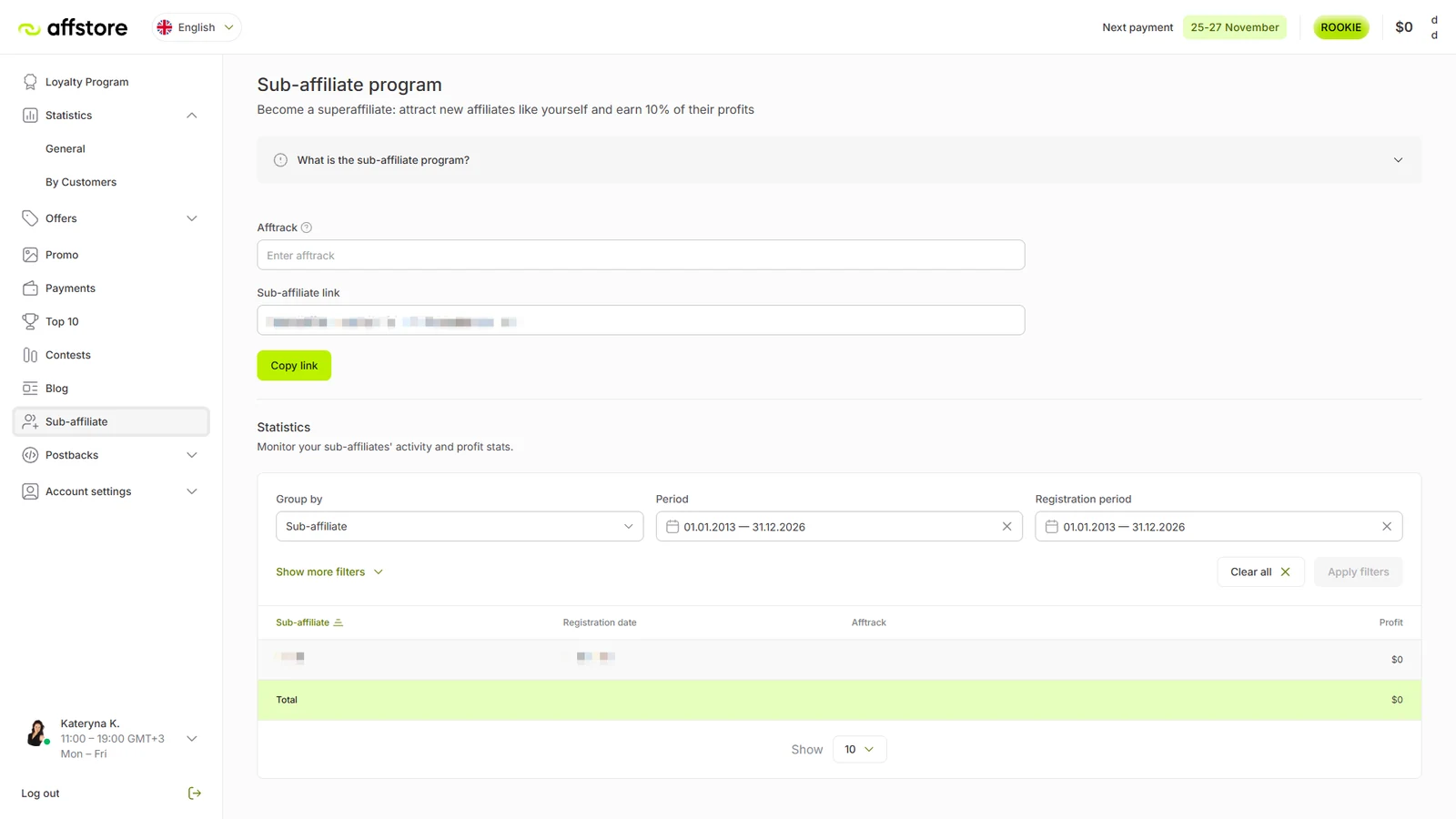
There is also a separate Sub-affiliate section advertising 10% of referred affiliates’ profits. This is an additional publisher-recruitment mechanism; it is not the same as earning 10% of a trader’s deposits. The section includes a recruitment link, an Afftrack field and its own statistics report.
ADDITIONAL PLATFORM FEATURES
Contests, Postbacks and Account Tools
Beyond basic offers and payments, the account navigation includes a Contests section, Top 10 rankings, Postbacks and Account settings. The screenshot shows active IQ Option-related contests with prizes and dates. These may matter to higher-volume webmasters who run several content channels, but they are extras rather than a replacement for the offer’s actual commission formula.
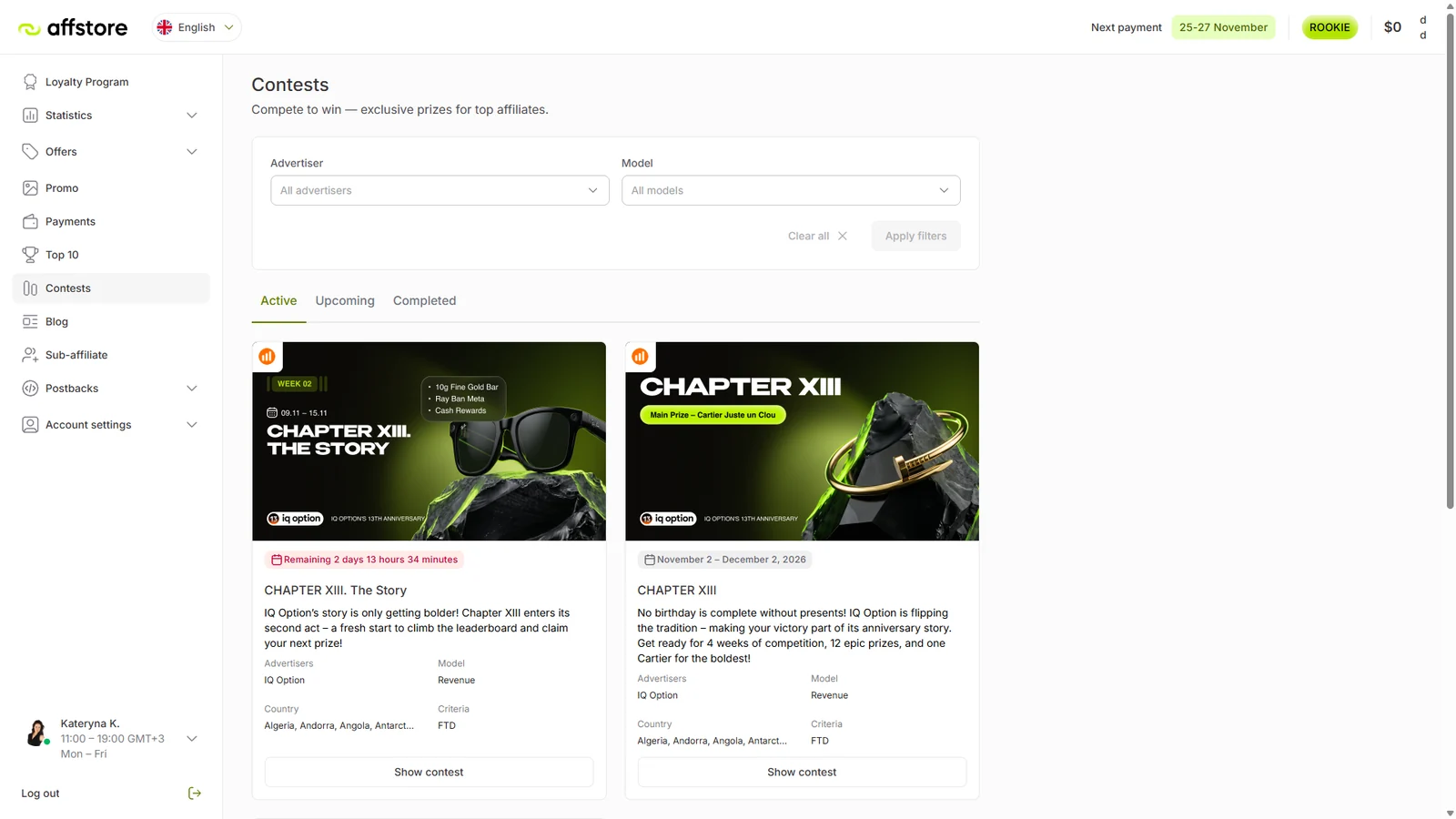
Postbacks are available as a named section in the account navigation. For publishers already using tracking software, this is a relevant capability to investigate during setup. The supplied screenshots do not include a completed postback configuration, so a specific endpoint or event format should not be invented in this guide.
OUR SCREEN REVIEW
Five Findings from the Real Affstore Partner Dashboard
- IQ Option and Exnova are active in the same account. Both show current 40% Revenue Share entries, but their advertised maximums are different.
- CPA is not universally pre-activated. The IQ Option CPA entry visible in this account requires activation; it would be misleading to promise a $120 CPA immediately after signup.
- Regional offers must be treated separately. IQ Option Europe has a different regional CPA listing from the broader IQ Option offer.
- Payouts are configured through the account. Method-specific thresholds, email confirmation and current payout availability can change how quickly an affiliate requests funds.
- Real tracking tools are available. Offer-level GEO, Afftrack, daily statistics, FTD, deposits and CSV/XLSX exports provide meaningful ways to compare campaigns.
That combination is what makes Affstore worth examining for a publisher working with both brands. A prospective partner can move from the commission comparison to the real account screens and decide how to structure traffic before creating links. For a trader-oriented review of the platforms themselves, see our separate IQ Option platform guide and Exnova platform guide; those are not substitutes for a publisher account.
FREQUENT QUESTIONS
IQ Option, Exnova and Affstore Affiliate FAQ
Where can I join the IQ Option affiliate program?
IQ Option offers are available through Affstore. Publishers can register with Affstore, choose an eligible IQ Option offer, and create tracking links after their account and offer access are ready.
Does Affstore also offer an Exnova partner program?
Yes. Exnova appears as an active Revenue Share offer in the supplied Affstore partner dashboard. The captured account displays a 40% current rate and an advertised ceiling of 70% for that offer.
What commission can a new Affstore partner receive?
The captured Rookie account displays 40% Revenue Share for IQ Option and Exnova. Advertised maximums are different: up to 80% for IQ Option and up to 70% for Exnova. Rates and eligibility depend on the individual offer and account.
Is the IQ Option CPA offer automatically active?
No. In the supplied account, IQ Option Revenue Share and Turnover offers are active, but the IQ Option CPA offer advertising up to $120 is marked inactive with an Activate control. It should not be presented as an automatically assigned payout.
Does Affstore provide turnover commissions?
The captured IQ Option offer list includes an active Turnover model advertised up to 5%. Turnover Share is calculated on a different base from Revenue Share, so the percentages are not directly comparable.
How can I track registrations and FTD in Affstore?
The Statistics section shows registrations, FTD, deposits and profit, with date and Afftrack filters, customizable columns, and CSV or XLSX exports. The available reporting views can help compare traffic sources and offers.
How much is the minimum Affstore withdrawal?
Minimums vary by method and payment type. The captured dashboard shows a $10 regular-payment balance condition and higher thresholds for some payout methods, including on-request withdrawals. Check the threshold beside your selected method.
How do Affstore sub-affiliate commissions work?
The Sub-affiliate section states that referring a new affiliate can earn 10% of that affiliate’s profits, subject to the program terms. This is separate from the Revenue Share earned on referred traders.
START WITH THE RIGHT OFFER
Choose IQ Option or Exnova in Affstore
Register as a publisher, review the active offer and its GEO, create a tracked link and follow the results in your own dashboard. The same account gives access to reporting, promotional materials and payment settings.
Join Affstore