First-hand demo evidence · five platforms · October 2026
Demo Account vs Real Account: What Changes When Money Becomes Real?
A demo account is useful evidence, but only for the things it can actually expose. It can show the interface, product labels, trade controls, displayed payout or profitability and how an order reaches history. It cannot by itself prove deposits, withdrawals, KYC outcomes, real-money restrictions, future execution or profitability.
What a Demo Account Can Actually Tell You
The strongest use of a demo account is practical: inspect the product before committing real money. You can see what the platform calls the product, which controls are exposed, how the amount and expiry or trade time are set, where the displayed return appears and what happens after the order closes.
That gives you first-hand evidence of workflow. It is stronger than copying a marketing page because you are looking at the actual platform state in the checked session.
It also gives you a baseline for later checks. If the real account exposes a different product label, asset set, ticket control or account restriction, you have a concrete comparison point instead of relying on memory. The useful habit is to preserve the demo evidence with its date and context, then treat any real-account difference as a new fact that needs its own verification.
Demo vs Real Account: The Evidence Matrix
We use this boundary across DigitalOptions.co so a screenshot is not asked to prove more than it contains.
| Check | Demo can verify? | Real account required? | What we can document |
|---|---|---|---|
| Platform interface | Yes | No | Layout, controls, menus and ticket structure in the checked session |
| Asset and product labels | Yes | No | What the platform actually calls Digital, Fixed Time, Quick Trading or OTC instruments |
| Expiry / trade-time controls | Yes | No | Available controls exposed before a demo order |
| Displayed payout / profitability | Yes, for that session | No | The value shown at capture time, not a permanent rate |
| Place and settle a demo trade | Yes | No | Order entry, open position, settlement and history workflow |
| Deposit methods and limits | No | Usually yes | Requires the current cashier / funding state |
| Withdrawal processing | No | Yes | Requires a real withdrawal flow; demo history is irrelevant to payout receipt |
| KYC outcome | Not reliably | Account-dependent | Verification can depend on funding, account state or a platform request |
| Regional / real-money restrictions | Not guaranteed | Often | Demo access does not establish full eligibility for every real-money function |
| Fairness of every price tick | No | No single account proves it | A screenshot shows a chart state, not the provenance or fairness of every quote |
| Profitability | No | No | Practice results do not predict future real-money results |
What We Verified in Five Demo Platforms
Each row ties a real screenshot to the exact workflow we checked. These products are often grouped online under the broad “binary options demo account” label, but the platforms themselves use different product names — Digital Options, Fixed Time and Quick Trading — so we preserve the labels shown in each interface. We keep the commercial action beside the evidence instead of ranking the platforms.
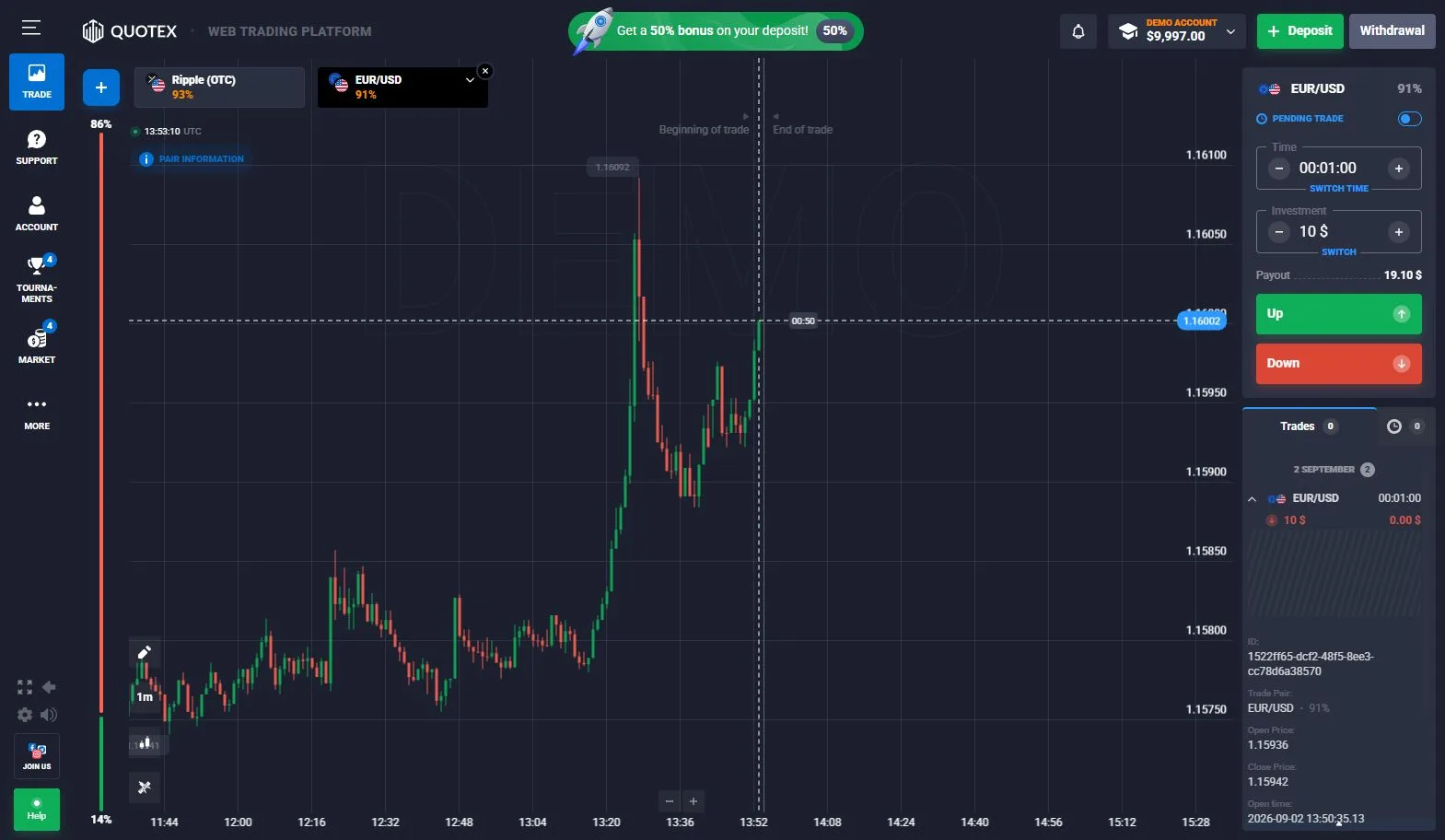
Quotex
Up / Down workflowWe checked the demo terminal, asset selector, displayed payout percentages, expiry controls and completed demo history. The captured account showed a virtual balance and a finished EUR/USD practice trade in history. This verifies the workflow we saw; it does not establish the same payment, verification or withdrawal state after funding.
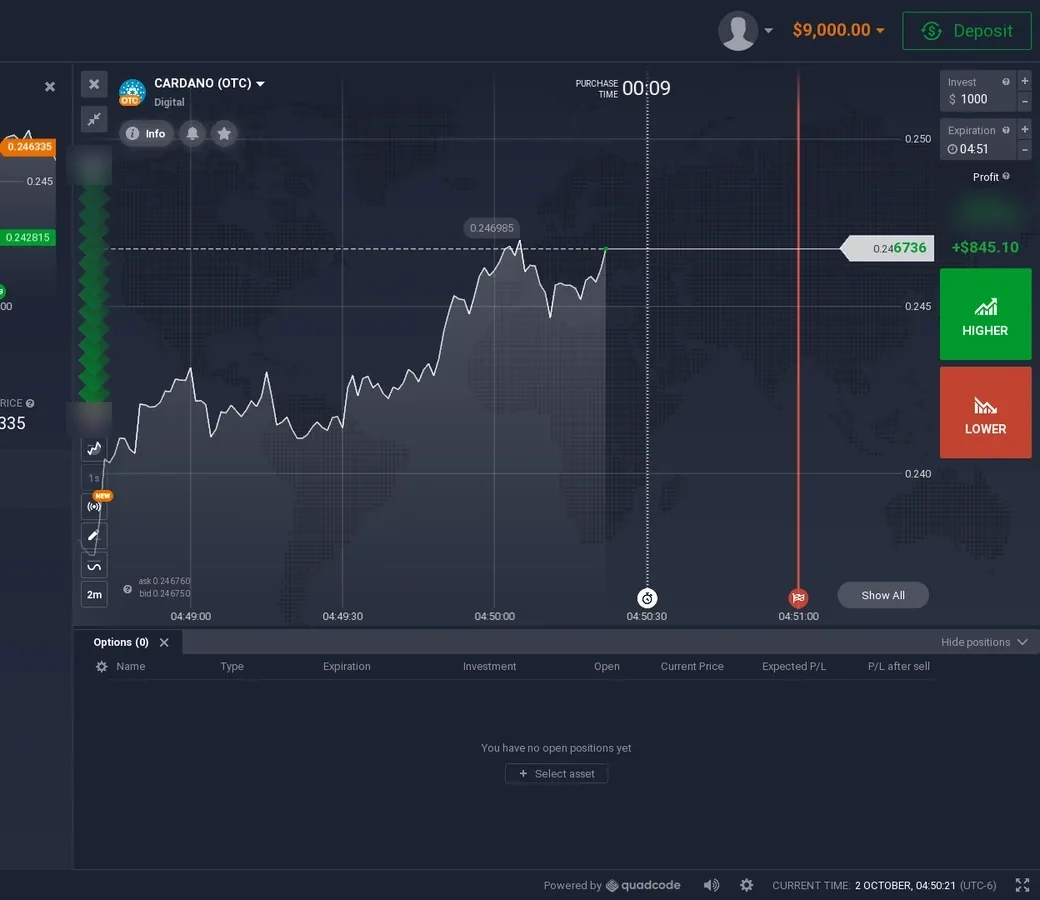
IQ Option
Digital Options with selectable strikesOur practice evidence covers the Digital category, Higher / Lower controls, strike levels, 1-, 5- and 15-minute expiration choices, displayed profitability, open-position information and completed history including manual early Sell. The screenshot proves the ticket and controls we observed, not future real-money execution.
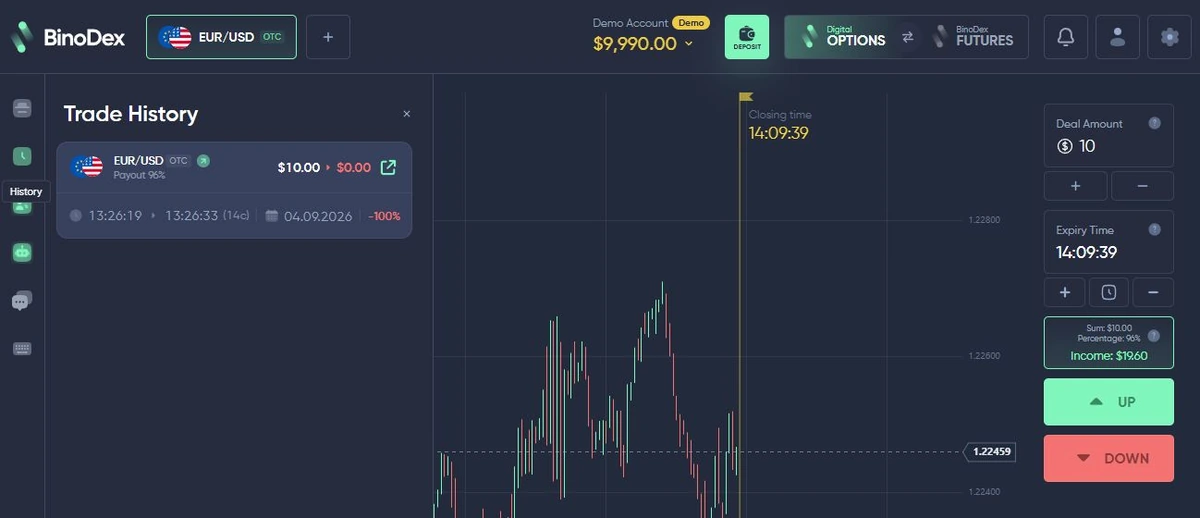
BinoDex
Digital OptionsWe completed a $10 EUR/USD OTC demo trade through settlement and history, with payout, amount and expiry visible in the workflow. Because the result reached history, this is stronger workflow evidence than an untouched terminal screenshot, while still remaining demo-only evidence.
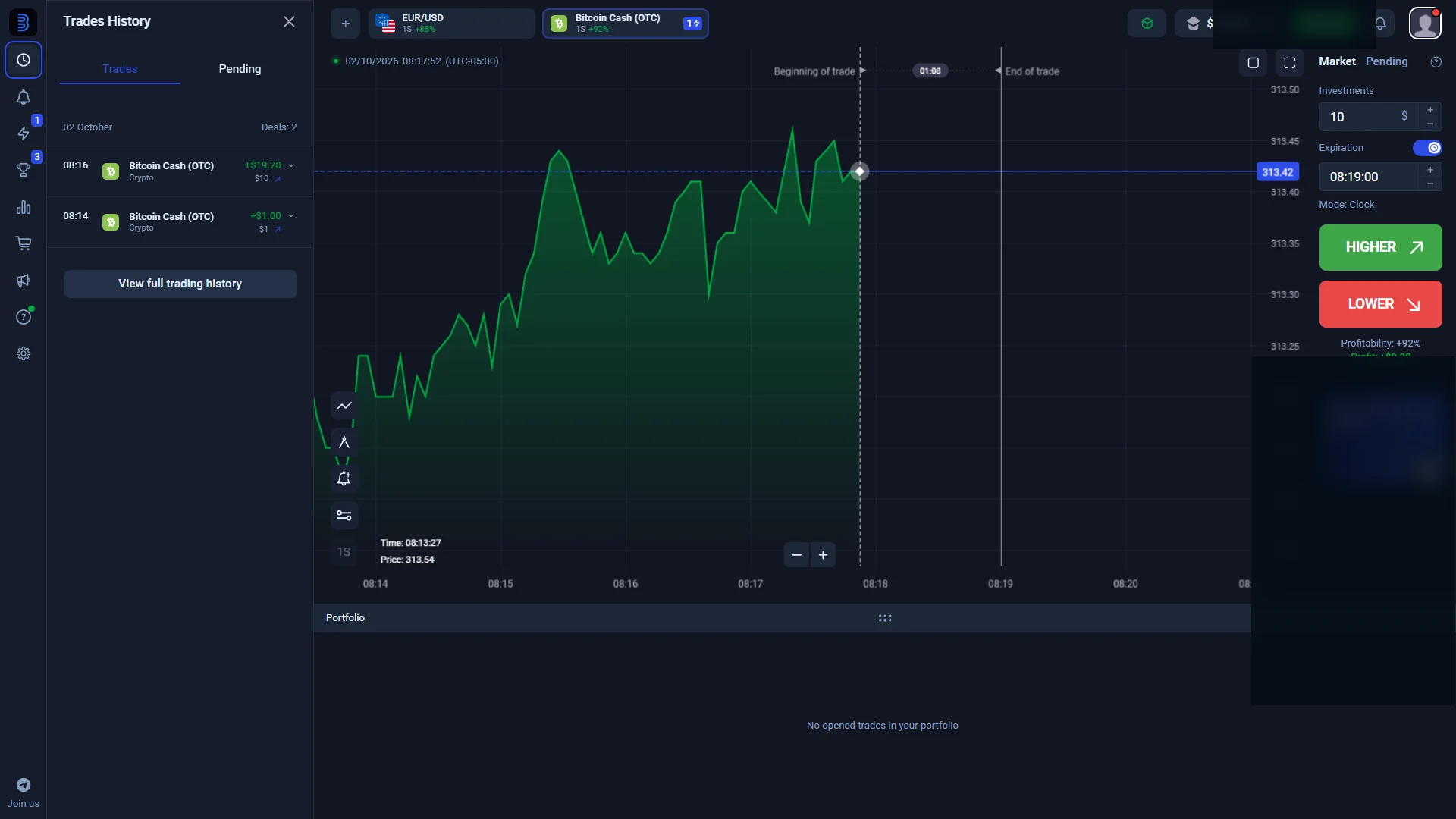
Binolla
Fixed Time terminalBinolla’s live terminal uses the Fixed Time label. We completed a $10 Bitcoin Cash OTC demo trade with a one-minute expiration and confirmed the finished order in Trades History. Binolla’s own education also uses Digital Options terminology, but we preserve the current terminal label in our evidence.
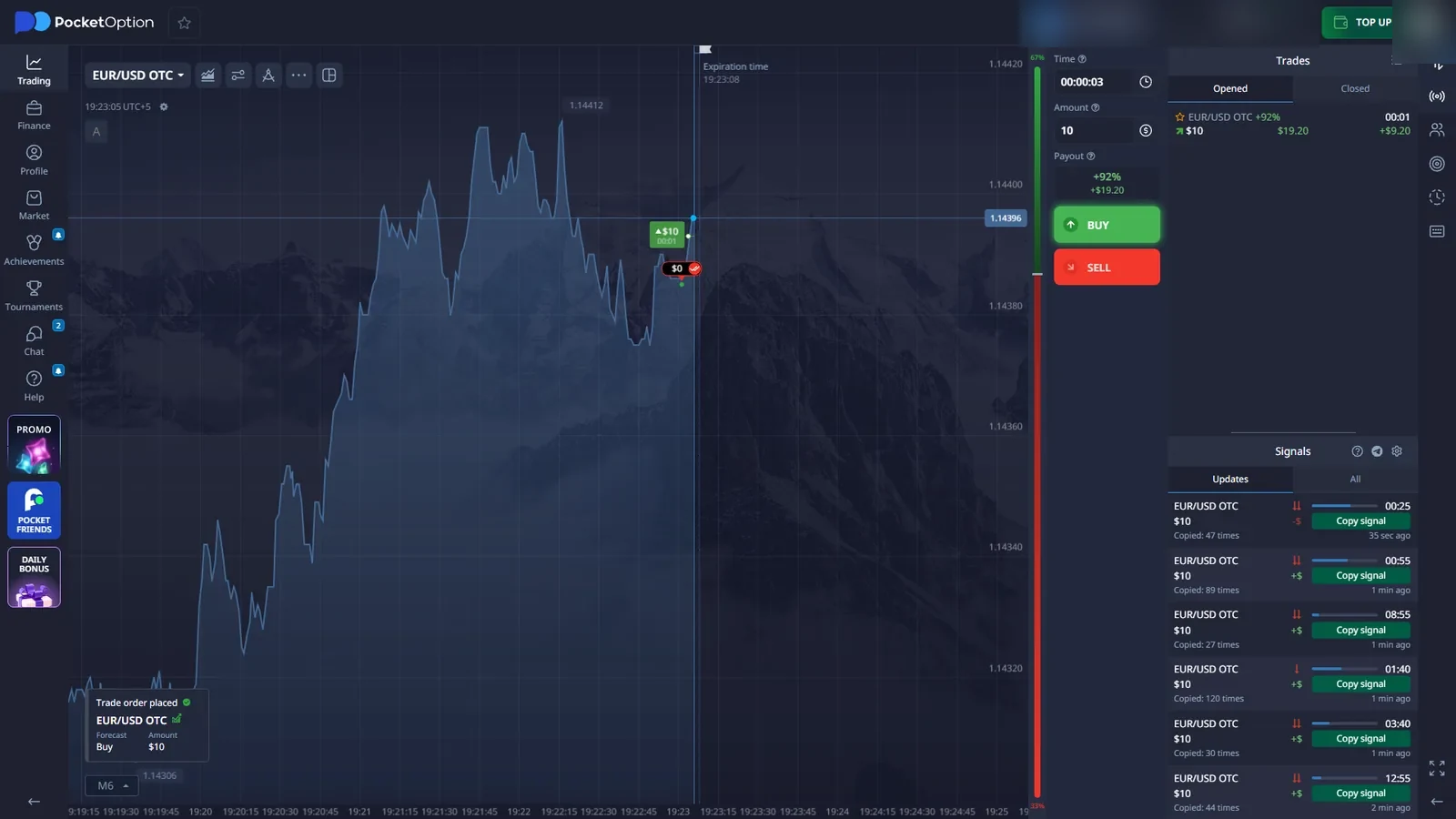
Pocket Option
Quick Trading / QT DemoOur current account shows QT Demo, BUY / SELL controls, short trade-time settings, OTC-labelled assets and the demo-order workflow. This platform is useful in the comparison because the product-name difference is obvious: we do not relabel Quick Trading as IQ Option-style selectable-strike Digital Options.
Additional demo-interface records are available for Tickz Trading, Events and Stocks, Olymp Trade Fixed Time and its completed demo history, and Exnova Digital, Binary, Blitz and Margin. These are separate platform checks, not extra rows in the five-platform evidence table above.
Commercial-link note: the primary buttons above are affiliate links. Pocket Option uses a confirmed direct demo route; Binolla uses the same current route already used for its demo CTA on our Binolla page. Quotex, IQ Option and BinoDex open their current platform routes, so we deliberately label those buttons “Visit” rather than claiming a direct demo deep-link.What Demo Access Can Verify Before You Deposit
Running these checks does not tell you whether a platform is safe or profitable. It reduces a narrower kind of uncertainty: whether the product you are considering actually exposes the controls, labels and workflow described elsewhere. If a platform lets you reach demo before funding, use that access to answer concrete interface questions rather than to chase a winning streak.
Check what the platform itself calls the product instead of relying on an affiliate site’s terminology.
See the categories and labels exposed in the current session, including OTC where relevant.
Confirm amount, expiry or trade time, strike controls where applicable, and direction buttons.
Record the payout or profitability shown on the current ticket and treat it as dynamic.
Place a practice trade and confirm how the platform records the completed position.
Check whether the actual interface, navigation and history make sense before considering funding.
What a Demo Cannot Prove About a Real Account
Deposits and Cashier Availability
A demo terminal does not establish which payment method will appear in your real account, the minimum for that route, the available currency or whether a method is available in your region. Those facts belong to the current cashier state. Our pre-deposit verification guide explains how to check them without treating a demo as funding evidence.
Withdrawals and KYC
A completed practice trade says nothing about whether a future withdrawal will be processed, which verification step may be requested or how long a real account review will take. If a real withdrawal becomes pending, rejected or missing, use the separate withdrawal problems guide.
Real-Money Restrictions and Account State
Demo access can be broader than real-money access. Country rules, provider policy, account state, payment route, product availability and verification status can all affect what is available after funding. A demo session should therefore be treated as a product check, not proof of full real-account eligibility.
Real-Money Pressure and Decision-Making
A practice account removes the direct financial consequence of a losing trade. Moving to a real or live account can therefore change how a person behaves even when the visible interface is familiar. Hesitation, changing stake size after a loss, chasing losses or abandoning a planned decision are user-behavior differences, not proof that the demo backend itself was inaccurate. This is another reason a profitable run with virtual funds cannot demonstrate future real-money performance. Demo results can show that you understand the controls and workflow; they cannot show how you will react when the outcome affects your own money.
Does Demo Use the Same Prices as a Real Account?
Do not assume identical pricing just because two charts look similar. A platform can expose similar visual data in demo and real modes while still using product-specific, session-specific or account-specific infrastructure behind the screen. Conversely, seeing a difference does not by itself prove manipulation.
The useful evidence is narrower: capture the product label, chart state, ticket and completed history, then compare them with the platform’s own description of the product. If a platform explicitly publishes how demo and real pricing are produced, that disclosure can add context, but it still should not be replaced by a universal assumption applied to every broker. For OTC specifically, price-source questions deserve their own analysis because a familiar ticker does not establish the same session or feed.
Quotex describes its demo as comparable to real trading except that virtual funds are used, and its current official site offers demo access without registration. Pocket Option states in its own demo material that trading instruments, quotes and operations are identical to the real account. Binolla describes demo as a simulation of real trading using virtual funds and exposes separate demo and real account modes after registration.
These are platform-specific published claims. They are useful context, but they are not independent proof that every backend condition is identical, and they should not be generalized to every broker.
See OTC Weekend Trading: What Are You Actually Trading? for the feed/session distinction.
Does a Demo Trade Prove the Platform Will Behave the Same With Real Money?
The distinction is easiest to understand by separating workflow evidence from financial-outcome evidence. A practice order can exercise the interface from entry to settlement. The moment the question becomes deposit acceptance, withdrawal receipt, KYC completion or real-money eligibility, the demo has reached the limit of what it can show.
- The order ticket accepts a practice order.
- The position opens in the checked workflow.
- The contract reaches settlement in demo.
- The completed position appears in history.
- Current controls and labels are visible.
- A real deposit will use the same account state.
- A real withdrawal will be approved or received.
- KYC will follow one universal path.
- Every price / execution condition is identical.
- Practice performance will continue with real money.
When Should You Switch From Demo to Real? Five Checks First
No demo result can prove that someone is ready for real-money trading. If you are considering funding an account, separate platform familiarity from payment, KYC, withdrawal and financial-risk checks.
- 1Find the exact asset and product label.
Do not assume that “Digital Options”, “Fixed Time” and “Quick Trading” are interchangeable labels just because the mechanics overlap.
- 2Inspect the trade ticket before clicking.
Record amount, expiry or trade time, strike controls where available, displayed payout / profitability and direction buttons.
- 3Place one small virtual trade.
The point is not to test a strategy. It is to confirm that you understand the order workflow from entry to open position.
- 4Wait for settlement and open history.
A completed history record is stronger workflow evidence than a screenshot of an untouched terminal.
- 5Separate the next financial checks.
Cashier methods, withdrawal rules, KYC and eligibility belong to a different evidence layer and should be verified before funding.
Should You Trust a Platform Because the Demo Works?
A working demo is useful positive evidence that the practice workflow exists and functioned in the checked session. It is not evidence of regulation, successful withdrawals, a future KYC outcome, financial safety, fairness of every quote or expected profitability.
That is why our platform pages separate observed, tested, completed and source-backed facts instead of turning one successful demo trade into a broad verdict. A good demo is one useful data point in a larger pre-funding check: entity and product identity, current account terms, payment routes and the evidence that actually belongs to those questions. See How We Verify for the full evidence model.
Demo vs Real Account FAQ
Is a demo trading account the same as a real account?
No. A demo can reproduce much of the visible trading workflow using virtual funds, but it does not establish that funding, withdrawals, KYC, account restrictions or every real-money condition will behave identically.
Can demo prices differ from real account prices?
They can, depending on the platform, product, session and pricing setup. A similar-looking chart is not proof that demo and real accounts use an identical backend feed, and a difference by itself is not proof of manipulation.
Does a successful demo trade prove withdrawals will work?
No. A completed demo trade proves that the practice-order workflow can reach settlement and history. It does not test deposits, withdrawal processing, payment rails, identity checks or receipt of real funds.
Can I check payout and expiry in demo mode?
Usually yes where those controls are exposed in demo. We use demo sessions to document displayed payout or profitability, expiry or trade-time controls and ticket behavior, while treating those values as session-specific rather than permanent.
Do I need KYC to use a demo account?
It depends on the platform and account state. Some demo environments are available before document verification, but that does not predict when KYC may be requested for funding, withdrawals or other real-account actions.
Which platforms have we tested in demo mode?
Our current first-hand evidence set covers demo or practice workflows on Quotex, IQ Option, BinoDex, Binolla and Pocket Option. Product labels differ: IQ Option exposes Digital Options, BinoDex uses Digital Options, Binolla labels the live terminal Fixed Time, and Pocket Option uses Quick Trading / QT Demo.

Alex is the independent web publisher behind DigitalOptions.co. He checks platform interfaces, demo workflows, completed history, payment screens and verification flows, and keeps first-hand observations separate from claims that require a real-money account or primary source.