Contract mechanics · first-hand platform evidence · October 2026
Digital Options Expiry Time: How Settlement Works
Expiry is the point at which a fixed-time contract reaches its scheduled endpoint and the platform determines the result. That sounds simple until different terminals show a countdown, an exact clock time, selectable expiry slots, a separate chart timeframe or an early-close button. This guide separates those controls and shows what our platform screenshots actually prove.
What Is Expiry Time in Digital Options?
Expiry time is part of the contract, not a chart setting. It tells the platform when the normal fixed-time position should stop and when its settlement condition should be evaluated. Before entry, the trader usually chooses or accepts an amount, a direction or strike condition, and an expiry or trade time. Once that endpoint is reached, the platform records the result according to the product rules.
The same contract-endpoint concept is often searched for as binary options expiry time, although platforms can use different product names and settlement rules.
The important detail is that the same concept can be presented differently. One interface can show a countdown such as 00:01:00. Another can show an exact closing time. A third can display fixed expiry slots or place a vertical marker on the chart. Those UI differences do not automatically mean the underlying contract principle is different: each is defining when the trade is scheduled to reach settlement.
Duration vs Exact Clock Expiry
The endpoint can be expressed as time remaining or as a scheduled clock time.
“1 minute from now”
The ticket starts from the current moment and adds a duration. If a one-minute trade is accepted at 14:34:20, the scheduled endpoint is roughly one minute later, subject to the platform’s execution and timing rules.
“Expires at 14:35”
The ticket points to a specific time on the clock. The remaining lifetime therefore depends on when the trade is opened. Two trades aimed at the same clock expiry can have different time remaining at entry.
Selectable expiration points
Some interfaces expose several predefined endpoints. The user chooses from the times currently available for that product and asset rather than typing an arbitrary duration.
The interface label is evidence of what was selectable in that session. It is not proof that the same expiry set will remain available for every asset, region or future session.
Chart Timeframe vs Contract Expiry
Controls how market data is grouped or displayed. A 1m candle groups a minute of price movement into one candle. Changing the chart timeframe changes the visual view and the amount of detail on screen.
Controls when the trade reaches its scheduled settlement point. It belongs to the order ticket or contract, not to the candle display.
A trader can therefore view a two-minute chart interval while holding a contract that expires at another time. The two clocks may visually overlap, but they serve different functions. When checking a platform, we look for the ticket’s expiry or trade-time control rather than assuming the candle selector tells us when the contract ends.
What Price Is Checked When the Contract Expires?
There is no single visual settlement model across every platform we cover. The relevant comparison level depends on the product.
The platform records a reference around entry and later compares the settlement price with that level. Direct Up/Down or Higher/Lower tickets commonly use this kind of workflow.
The trader selects a strike level before entry. At expiry, the result is determined relative to that strike under the product rules. Our current IQ Option Digital evidence is the clearest example in this project because several strike levels are visible at once.
That distinction matters because “the price went up” is not enough to describe every Digital Options outcome. On a selectable-strike product, the relevant question is whether the settlement condition around the chosen strike was satisfied. On a reference-price product, the comparison can instead be tied to the recorded opening/reference level.
How Higher and Lower Trades Are Settled at Expiry
The platform records the contract configuration and relevant price or strike.
The contract remains active until the scheduled endpoint unless the product allows and the user uses an early-close function.
The settlement price is compared with the reference or selected strike under that product’s Higher/Lower or Up/Down rule.
The platform writes the completed position to history with whatever timestamps, prices and outcome fields that interface exposes.
This page deliberately stops at mechanics. It does not recommend whether a Higher or Lower direction should be chosen and does not treat a shorter or longer expiry as inherently better.
What Happens When the Prices Are Equal?
If the settlement price exactly matches the relevant reference or strike, the result is not safe to infer from the word “digital” or “binary.” Current product rules can define equality differently. Some contracts can void or return the stake; other product rules can classify equality differently.
For DigitalOptions.co, the rule is simple: we do not copy a tie/refund assumption from one broker to another. We check the current contract terms for the specific product. The screenshots on this page prove ticket controls, selected times, history and early-close behavior; they do not by themselves prove every edge-case settlement rule.
Can a Digital Option Be Closed Before Expiry?
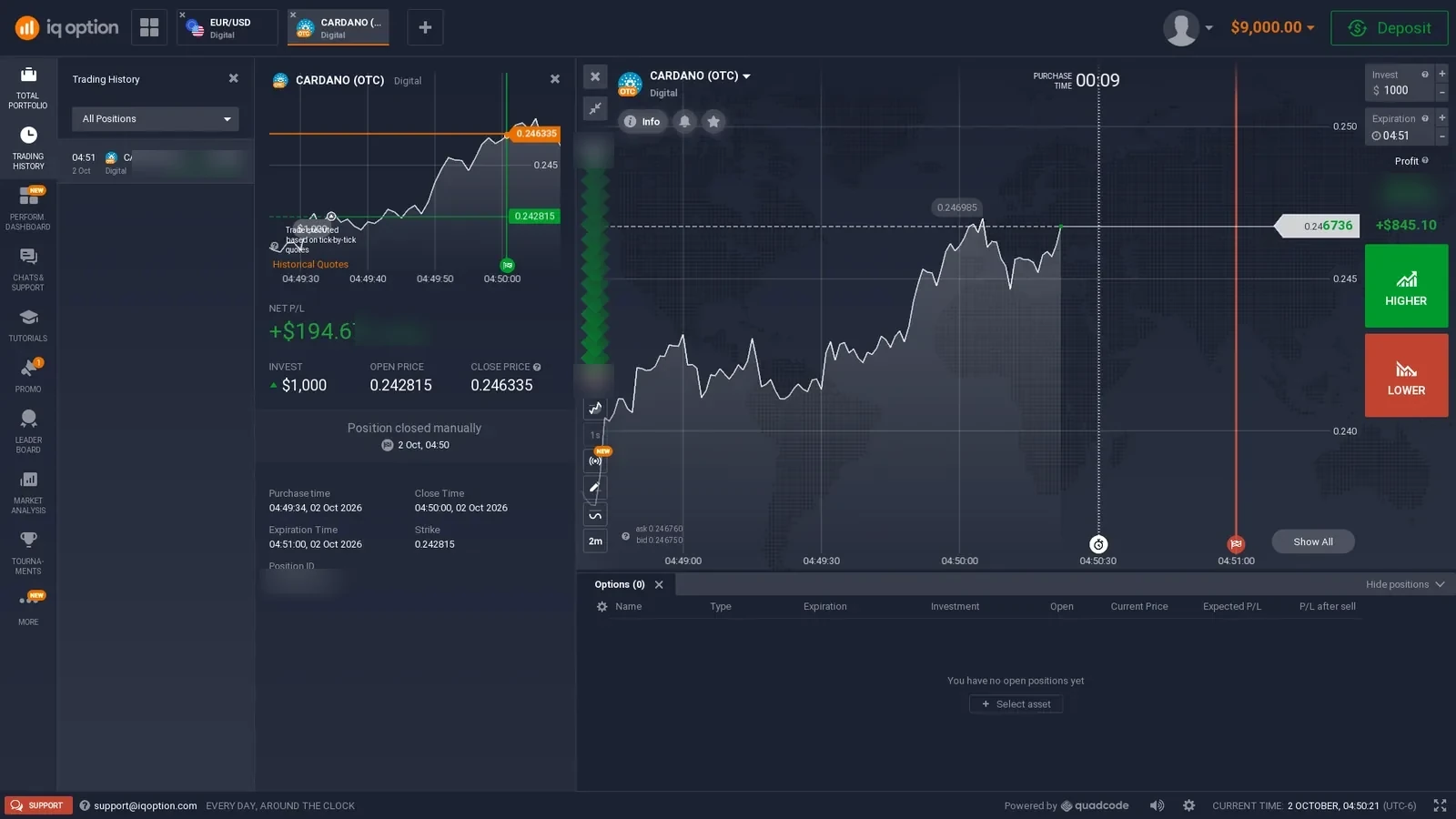
Sometimes, but not on every product. A time-locked contract has to remain open until its expiry. An early-close product adds another possible endpoint: the user can exit before the scheduled expiry when the function is available.
Our October 2026 IQ Option check gives us direct first-hand evidence. The completed demo position records a $1,000 displayed investment, open price / strike of 0.242815, manual close at 04:50:00 and scheduled expiration at 04:51:00. The interface explicitly records the position as closed manually.
This is why expiry and close time should not always be treated as synonyms. Expiry is the scheduled contract endpoint; an early-close feature can end the position sooner and can use its own exit value.
How Expiry Appears on Five Trading Platforms
These are first-hand captures from our existing platform checks. We use them to show interface mechanics, not to rank the brokers or recommend a trade duration.
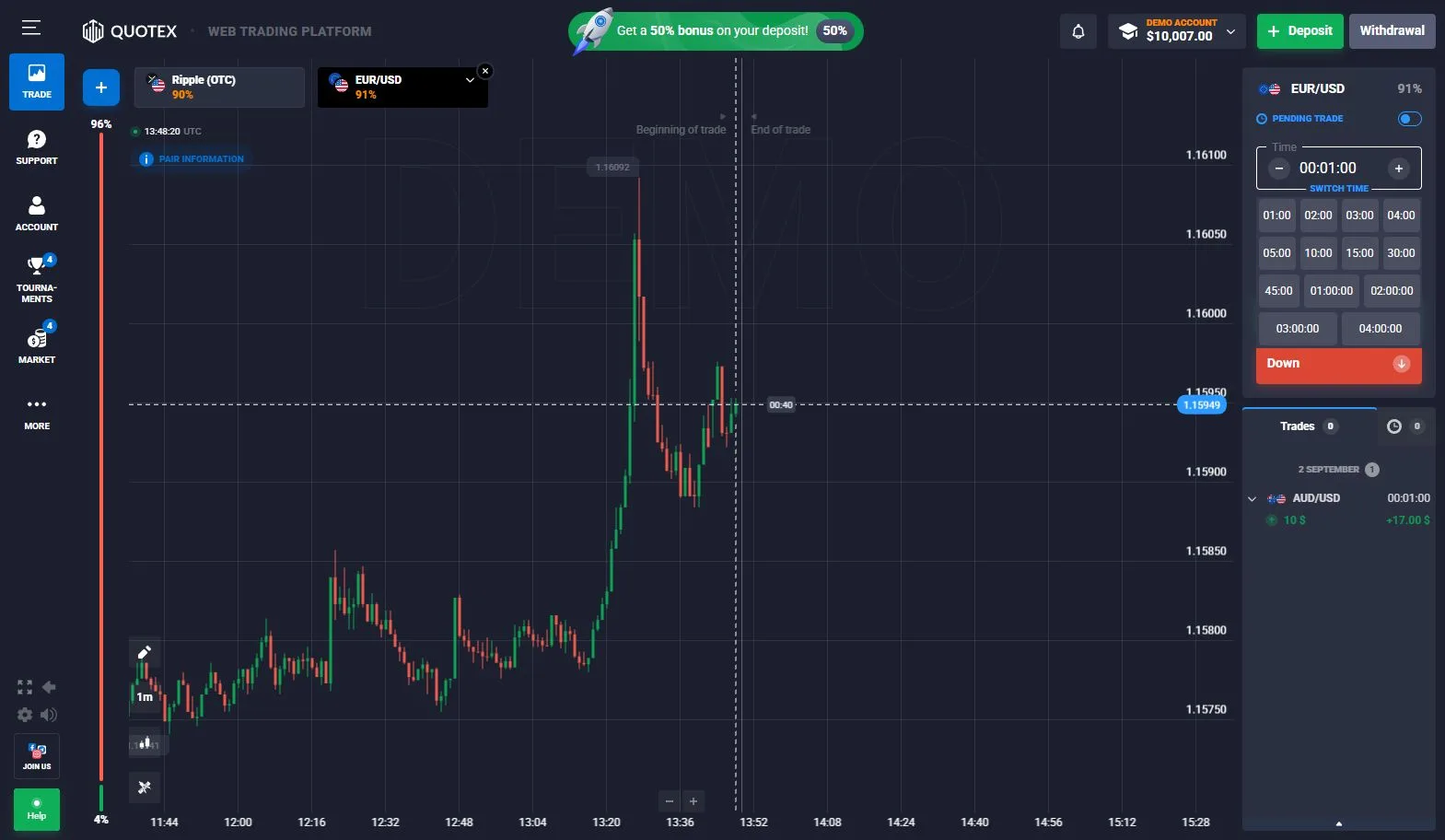
Quotex
The checked Digital Options ticket exposed a one-minute time field plus multiple selectable time options beside the chart. A separate completed-order capture confirms that finished demo positions are recorded in the trade panel.
Quotex platform evidence →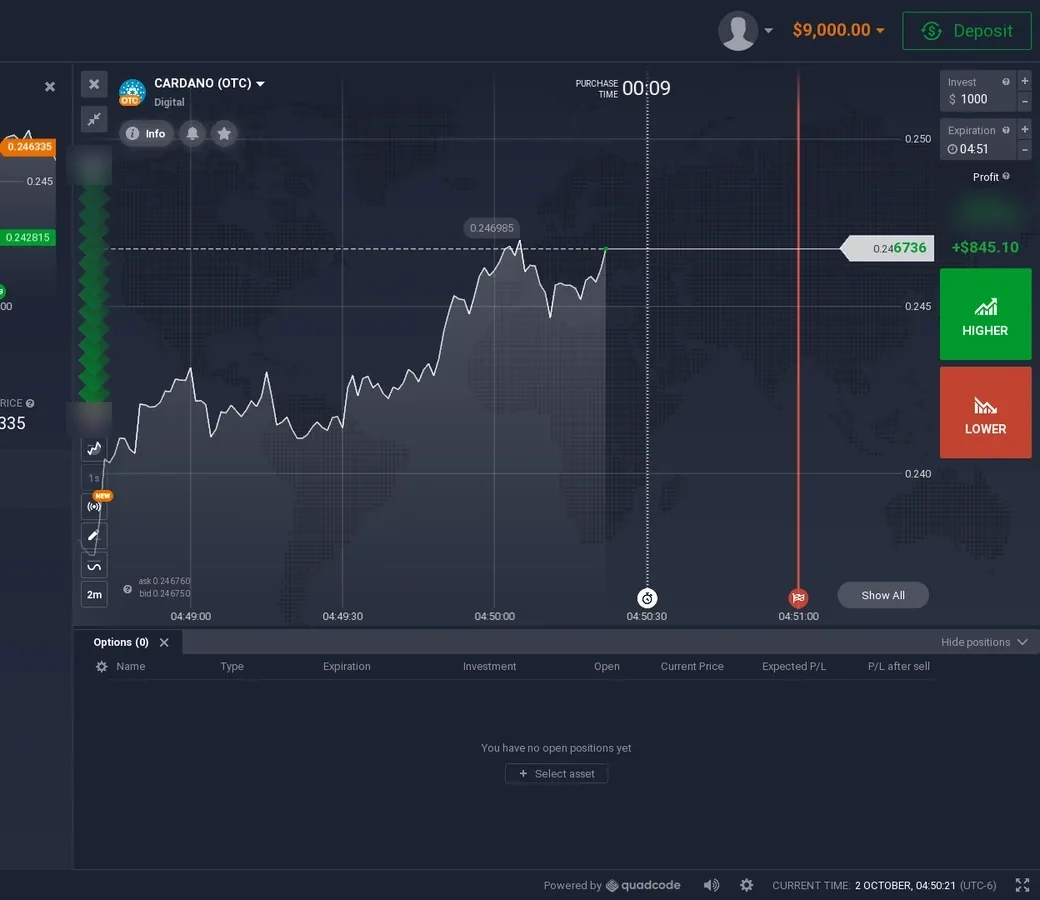
IQ Option Digital
The Digital ticket combines a scheduled expiration with selectable strike levels and Higher / Lower controls. Our completed-position evidence separately proves that the same product can expose manual early Sell.
IQ Option platform evidence →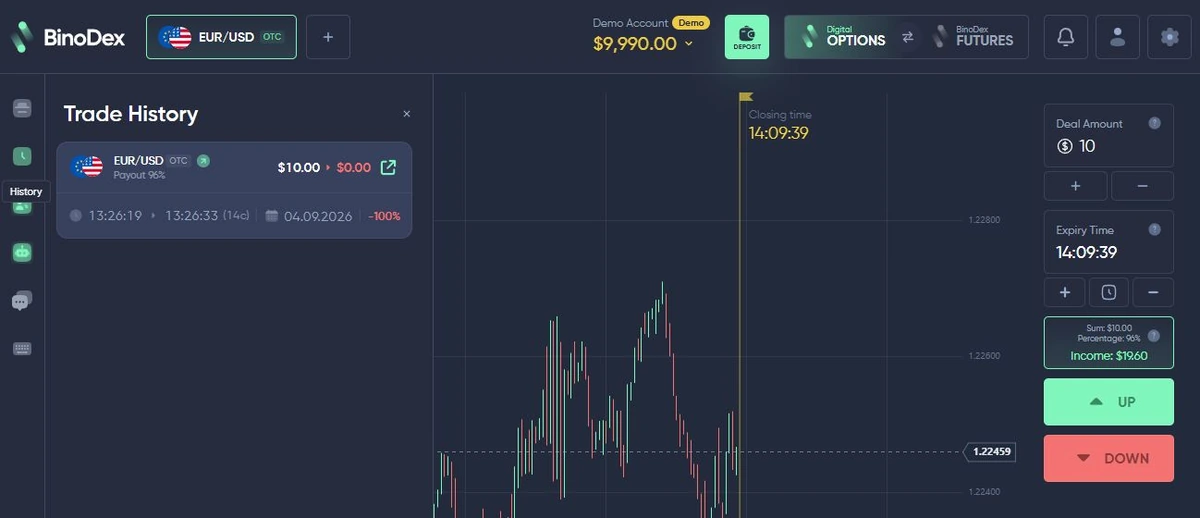
BinoDex
The BinoDex Digital Options capture shows an expiry-time control on the ticket and a completed EUR/USD OTC demo order in history. The history records the finished order separately from the currently selected expiry on the ticket.
BinoDex platform evidence →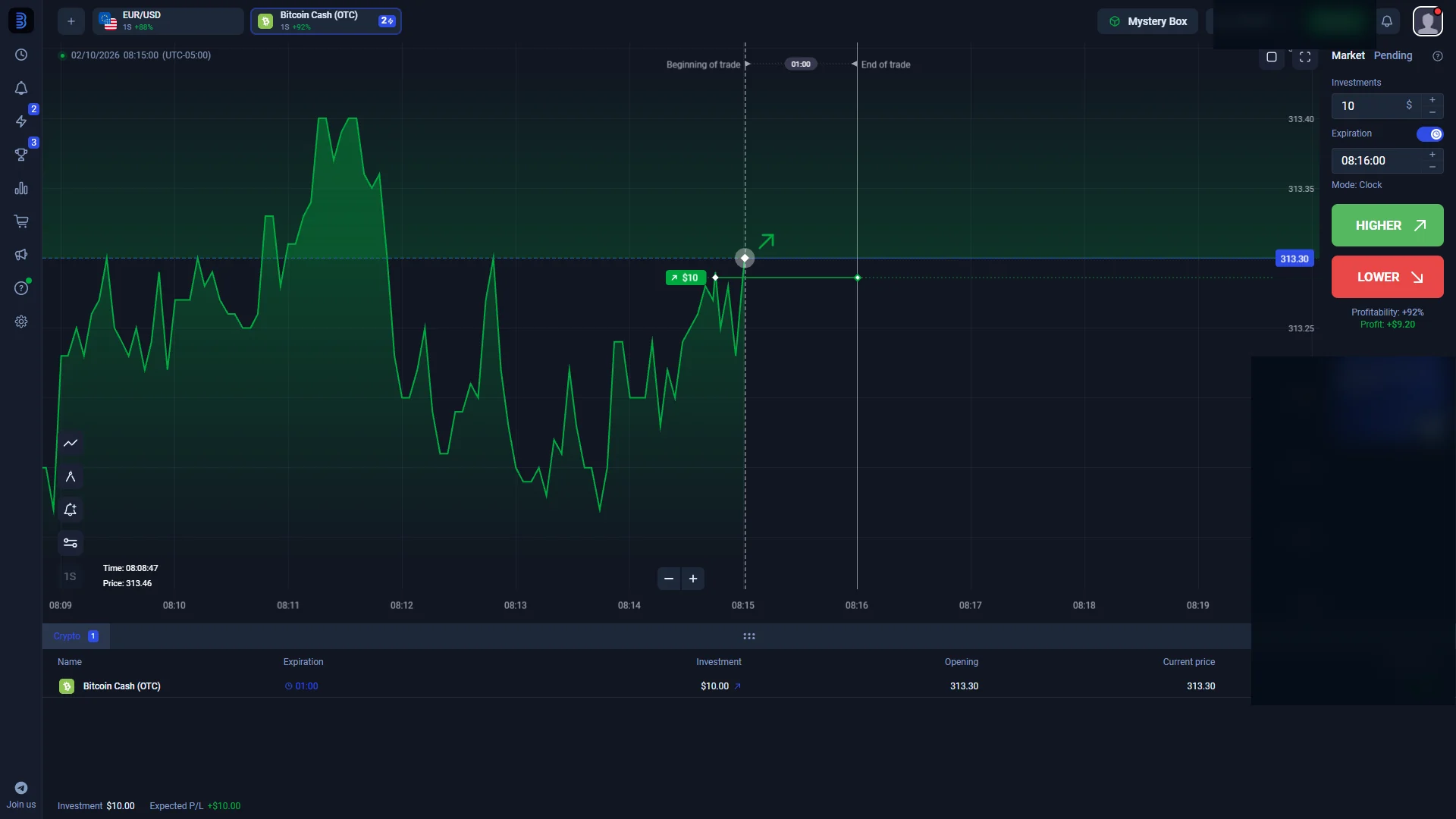
Binolla Fixed Time
The checked terminal labels the product Fixed Time and exposes a compact duration control beside the amount and Higher / Lower buttons. The product name differs, but the contract still has a defined endpoint that determines the normal settlement moment.
Binolla platform evidence →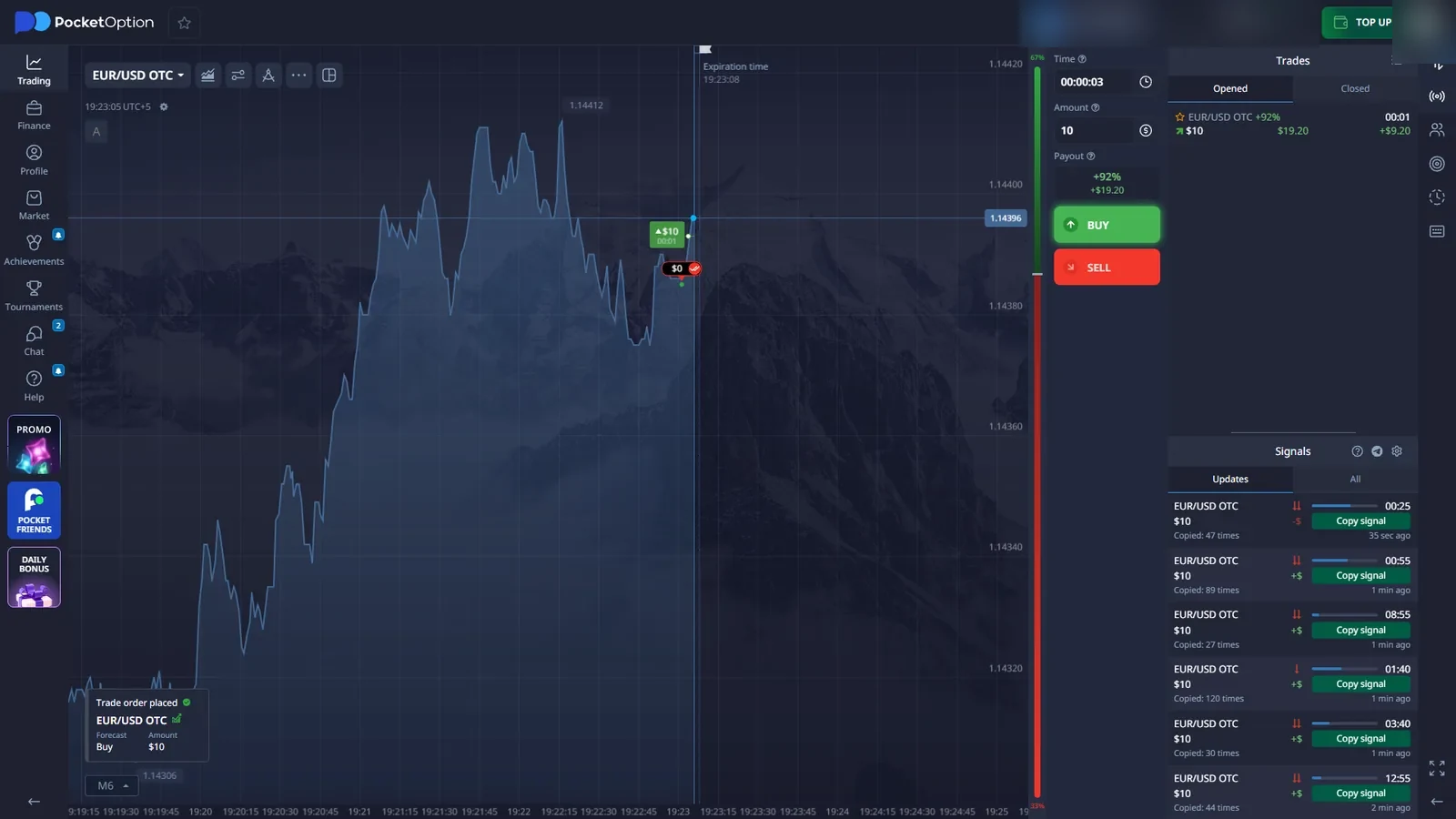
Pocket Option Quick Trading
The current short-duration workspace is labelled Quick Trading / QT Demo rather than an IQ-style Digital Options mode. Our checked session exposed very short trade-time controls, reinforcing why the product label and the ticket itself matter more than a generic category name.
Pocket Option platform evidence →Further first-hand timing examples: the Olymp Trade Fixed Time check documents a five-second duration choice, while the Exnova Digital evidence shows scheduled expiry alongside a separate Return After Sell value. These examples sit outside the five-platform gallery above.
What a Completed Trade Actually Proves
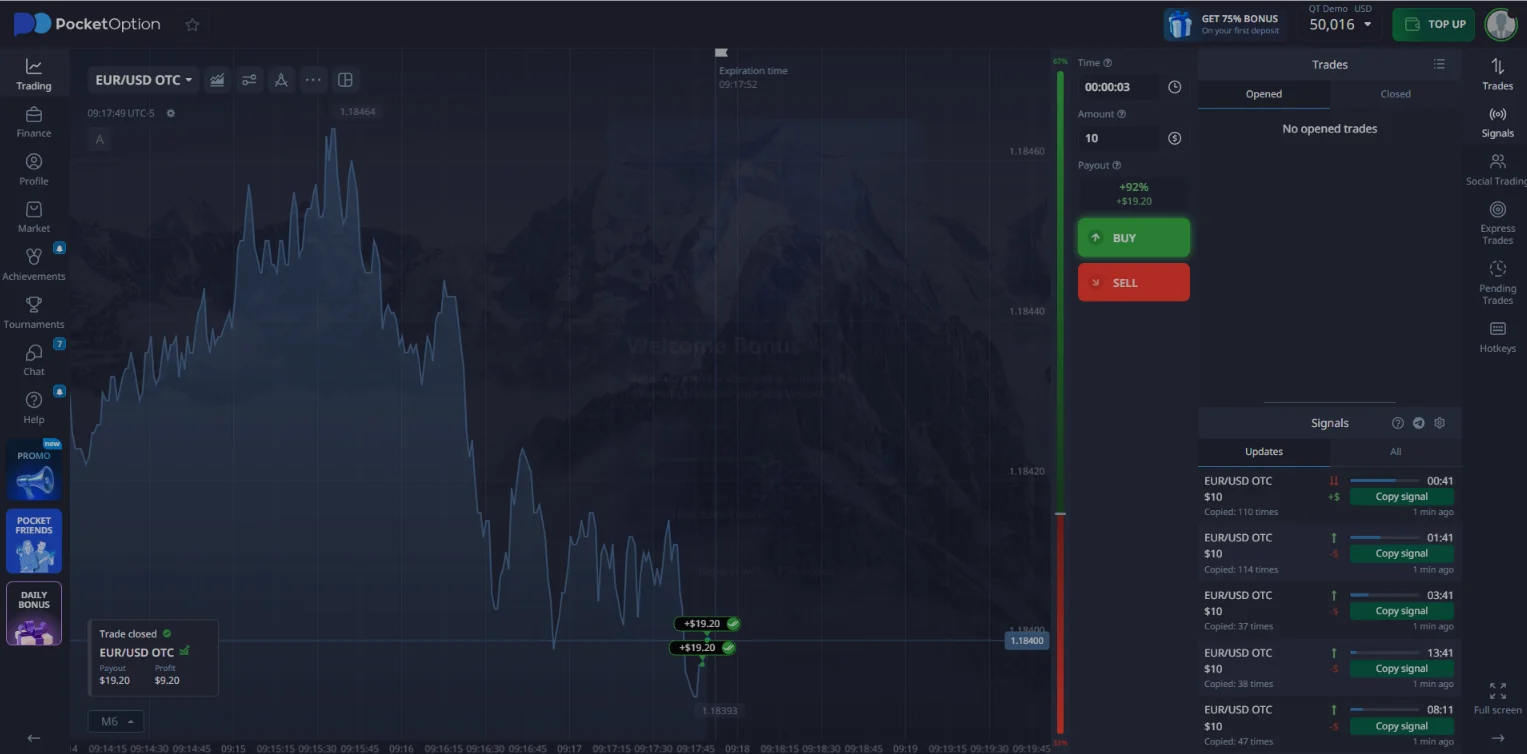
A pre-trade screenshot tells us what the ticket exposed before entry: product label, amount, direction controls, expiry or trade time, strike where applicable, and the displayed return in that session. A completed-history screenshot answers a different question: did the order move through the platform and reach a recorded outcome?
Where history exposes them, timestamps can also show the relationship between purchase time, scheduled expiry and actual close time. That is especially useful for spotting an early close. It also prevents us from using a static marketing screenshot as proof that a full demo workflow was completed.
History has limits. It does not establish that the quoted price source was fair, that a future trade will behave identically, that real-money withdrawals work, or that the platform is suitable for a particular user. For those boundaries, see Demo Account vs Real Account. For the arithmetic of a standard displayed payout, use the Payout & Break-Even Calculator.
Digital Options Expiry Time FAQ
Is expiry time the same as chart timeframe?
No. Chart timeframe controls how price data is grouped or displayed, such as one-minute candles. Expiry is the contract endpoint used to determine the trade result. Changing the chart view does not automatically change the contract expiry.
Can expiry be shown as a duration or as a clock time?
Yes. A platform can show a duration such as one minute from now, an exact clock time such as 14:35, or selectable expiry slots. These interfaces express when the contract is scheduled to end, but the presentation differs by platform.
What price is checked when a digital option expires?
It depends on the contract model. Some products compare the closing price with the price recorded when the trade was opened, while selectable-strike products compare the closing price with the chosen strike. The platform terms and ticket determine the relevant reference level.
What happens if the settlement price equals the reference price?
There is no universal tie rule across all fixed-time products. Equality can be handled differently by different platforms or product types, so the contract terms for the specific platform should be checked instead of assuming every tie is refunded.
Can a digital option be closed before expiry?
Sometimes. Some products are locked until expiry, while others expose an early-close or Sell function. We directly verified manual early Sell in the current IQ Option Digital interface, including a position that was closed before its scheduled expiration.
Can available expiry times change?
Yes. Available times can depend on the platform, product, asset, session and account state. A screenshot proves the choices visible in that checked session; it should not be treated as a permanent list of expiries for every asset.

Alex checks live trading interfaces, demo workflows, order history and product terminology for DigitalOptions.co. This guide uses first-hand screenshots to explain expiry mechanics without turning the topic into trading advice.